
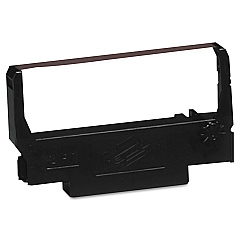
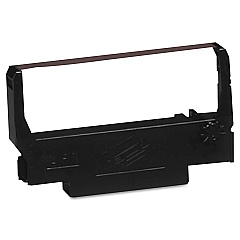





Epson TM-U210 D Retail Equip. POS/Cash Reg. Supplies

Ads

Epson TM-U210 D POS Printer Ribbon

Ensure smooth operations at your point-of-sale with Epson TM-U210 D Retail Equip. POS/Cash Reg. Supplies. This reliable printer is essential for businesses, schools, government offices, healthcare facilities, and wholesale operations. Compatible with both Epson ERC-38 Black Red Ribbon Cartridge and Epson ERC-38 Black Ribbon Cartridge, the TM-U210 D delivers crisp, clear receipts and reports. Its compact design saves valuable counter space, while its durability withstands high-volume environments. The easy-to-replace ribbon cartridges minimize downtime, keeping your operations running efficiently. Whether you're printing receipts, kitchen orders, or transaction logs, the Epson TM-U210 D consistently produces high-quality output. Invest in these supplies to maintain peak performance of your Epson TM-U210 D printer and ensure customer satisfaction with every transaction. Choose the right supplies for your specific needs and enjoy uninterrupted printing for your daily operations.

Epson TM-U210 D Retail Equip. POS/Cash Reg. Supplies FAQs

  • What types of ribbon cartridges are compatible with the Epson TM-U210 D?

    The Epson TM-U210 D is compatible with Epson ERC-38 Black Red Ribbon Cartridge and Epson ERC-38 Black Ribbon Cartridge.

  • How often should I replace the ribbon cartridge in my Epson TM-U210 D?

    The frequency of replacement depends on usage, but typically, you should replace the ribbon when print quality begins to fade or becomes illegible.

  • Can I use third-party ribbon cartridges with the Epson TM-U210 D?

    While third-party cartridges may work, it's recommended to use genuine Epson supplies to ensure optimal performance and print quality.

  • Is the Epson TM-U210 D suitable for high-volume printing environments?

    Yes, the Epson TM-U210 D is designed to withstand high-volume printing environments and is durable enough for continuous use.

  • How do I install a new ribbon cartridge in the Epson TM-U210 D?

    To install a new ribbon, open the printer cover, remove the old cartridge, insert the new one ensuring it's properly seated, and close the cover. Refer to the user manual for detailed instructions.

  • Can the Epson TM-U210 D print in color?

    The Epson TM-U210 D can print in black and red when using the Epson ERC-38 Black Red Ribbon Cartridge. For single-color printing, use the Epson ERC-38 Black Ribbon Cartridge.

  • What is the print speed of the Epson TM-U210 D?

    The Epson TM-U210 D has a print speed of approximately 6 lines per second for text printing.

  • Is the Epson TM-U210 D compatible with my POS software?

    The Epson TM-U210 D is compatible with most POS software. However, it's best to check with your software provider or Epson's compatibility list to ensure compatibility.

  • How long does a ribbon cartridge typically last in the Epson TM-U210 D?

    The lifespan of a ribbon cartridge varies depending on usage, but on average, it can last for about 4 million characters.

  • Does the Epson TM-U210 D require any special maintenance?

    Regular cleaning of the print head and proper ribbon replacement are the main maintenance tasks. Refer to the user manual for specific maintenance instructions and schedules.

Warehouse Locations

Policy & Agreement | Copyright © 1995-2026 BlueDogInk.com
