





Ads

Epson TM-S2000 Black Ink Cartridges

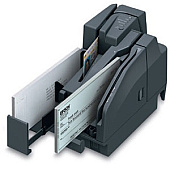
Ensure uninterrupted operation of your check processing system with genuine Epson TM-S2000 Ink Cartridges. These high-quality cartridges, specifically the Epson C33S020484 Black Ink Cartridge, are designed to deliver crisp, clear imprints on checks and other financial documents. Compatible with the Epson TM-S2000 multifunction teller device, these cartridges offer reliable performance and consistent output, crucial for businesses, banks, and financial institutions. The specially formulated ink resists fading and smudging, ensuring long-lasting legibility of important financial records. By choosing authentic Epson cartridges, you guarantee optimal functionality of your TM-S2000 system, reducing downtime and maintaining efficiency in your daily operations. Don't compromise on quality – trust Epson TM-S2000 Ink Cartridges for all your check processing needs.

Epson TM-S2000 Thermal Printers Supplies FAQs

  • How long does an Epson TM-S2000 ink cartridge typically last?

    The lifespan of an Epson TM-S2000 ink cartridge depends on usage, but it typically lasts for about 100,000 to 150,000 check imprints.

  • Is the Epson C33S020484 Black Ink Cartridge compatible with other Epson devices?

    The C33S020484 is specifically designed for the Epson TM-S2000 and may not be compatible with other Epson devices. Always check your device's specifications for the correct cartridge.

  • How can I tell when it's time to replace my Epson TM-S2000 ink cartridge?

    The TM-S2000 device typically has an indicator light or on-screen message that alerts you when ink levels are low and it's time to replace the cartridge.

  • Are there any color options available for the Epson TM-S2000 ink cartridges?

    No, the Epson TM-S2000 uses only black ink cartridges (C33S020484) for check processing and document printing.

  • Can I use third-party ink cartridges in my Epson TM-S2000?

    While third-party cartridges may work, using genuine Epson cartridges is recommended to ensure optimal performance and to maintain your device's warranty.

  • How should I store unused Epson TM-S2000 ink cartridges?

    Store unused cartridges in a cool, dry place away from direct sunlight. Keep them in their original packaging until ready for use to prevent drying out.

  • What should I do if my Epson TM-S2000 isn't recognizing the new ink cartridge?

    Ensure the cartridge is properly installed and seated. If issues persist, clean the cartridge contacts and try reinserting. If problems continue, contact Epson support.

  • Is the Epson C33S020484 ink cartridge recyclable?

    Yes, Epson offers a cartridge recycling program. Check their website for details on how to properly recycle your used ink cartridges.

  • How often should I replace the ink cartridge in my Epson TM-S2000?

    Replace the cartridge when the device indicates low ink levels or if you notice a decrease in print quality. Regular users might need to replace it every few months.

  • Can I refill my Epson TM-S2000 ink cartridge instead of buying a new one?

    Epson does not recommend refilling cartridges as it may affect print quality and potentially damage the device. Always use new, genuine Epson cartridges for best results.

Warehouse Locations

Policy & Agreement | Copyright © 1995-2026 BlueDogInk.com
