




Ads

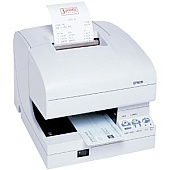
Epson TM-J7000 Black Ink Cartridges

Ensure uninterrupted printing with high-quality Epson TM-J7000 Ink Cartridges. These reliable cartridges are specifically designed for the Epson TM-J7000 printer, delivering crisp, smudge-resistant text and graphics for your business needs. The Epson SJIC8 Black Ink Cartridge offers exceptional yield and consistency, making it ideal for high-volume printing environments such as retail, hospitality, and healthcare. With its quick-drying formula, you can expect professional-looking receipts, invoices, and labels every time. These cartridges are easy to install and maintain, minimizing downtime and maximizing productivity. Choose genuine Epson TM-J7000 Ink Cartridges for optimal performance and longevity of your printer. Whether you're printing barcodes, logos, or text, these cartridges ensure your documents make a lasting impression. Trust in Epson's commitment to quality and reliability for all your printing needs.

Epson TM-J7000 Thermal Printers Supplies FAQs

  • How long does an Epson SJIC8 Black Ink Cartridge typically last?

    The lifespan of an Epson SJIC8 Black Ink Cartridge depends on usage, but it generally lasts for about 4 million characters.

  • Are these ink cartridges compatible with other Epson printers?

    No, the Epson SJIC8 Black Ink Cartridge is specifically designed for use with the Epson TM-J7000 printer series.

  • How do I install the ink cartridge in my Epson TM-J7000 printer?

    To install, open the printer cover, remove the old cartridge, insert the new one until it clicks into place, and close the cover.

  • Can I use third-party ink cartridges in my Epson TM-J7000 printer?

    While third-party cartridges may work, using genuine Epson cartridges ensures optimal print quality and prevents potential damage to your printer.

  • How should I store unused ink cartridges?

    Store unused cartridges in a cool, dry place away from direct sunlight. Keep them in their original packaging until ready for use.

  • What should I do if my prints appear faded or streaky?

    First, try cleaning the print head using the printer's maintenance function. If the issue persists, you may need to replace the ink cartridge.

  • Are these ink cartridges environmentally friendly?

    Epson is committed to environmental sustainability and offers a cartridge recycling program for proper disposal of used cartridges.

  • How can I check the ink levels in my Epson TM-J7000 printer?

    You can check ink levels through the printer's control panel or by using the Epson monitoring software on your connected computer.

  • Do these cartridges come with a warranty?

    Yes, genuine Epson ink cartridges come with a limited warranty against defects in workmanship and materials.

  • Can I refill these ink cartridges myself?

    Epson does not recommend refilling cartridges as it may affect print quality and potentially damage your printer. It's best to use new, genuine Epson cartridges.

Warehouse Locations

Policy & Agreement | Copyright © 1995-2026 BlueDogInk.com
