




Ads

Epson Stylus Pro 7900 24 In Maintenance Kits

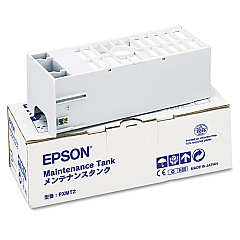
Enhance your printing experience with Epson Stylus Pro 7900 24 In Ink Cartridges, designed to deliver exceptional quality and performance for professional-grade outputs. These high-capacity cartridges are perfect for businesses, educational institutions, government agencies, healthcare facilities, and wholesale operations that demand superior print quality and efficiency. Compatible with the Epson Stylus Pro 7900 24-inch printer, these cartridges produce vivid colors and sharp details across a wide range of media. The lineup includes the essential Epson C12C890191 Ink Maintenance Tank, which efficiently collects waste ink to ensure optimal printer performance. By choosing genuine Epson cartridges, you'll maximize your printer's lifespan and maintain consistent, high-quality results. Whether you're printing large-format graphics, technical drawings, or photographic masterpieces, these ink cartridges deliver the reliability and precision you need for professional-grade output.

Epson Stylus Pro 7900 24 In Ink Cartridges FAQs

  • What is the page yield for Epson Stylus Pro 7900 24 In Ink Cartridges?

    Page yield varies depending on the specific cartridge and print content. For accurate estimates, consult the product specifications or contact Epson support.

  • Are these cartridges compatible with other Epson printer models?

    These cartridges are specifically designed for the Epson Stylus Pro 7900 24-inch printer. They may not be compatible with other models.

  • How often should I replace the Epson C12C890191 Ink Maintenance Tank?

    Replace the maintenance tank when prompted by your printer or when it reaches full capacity. This varies based on usage.

  • Can I use third-party ink cartridges with my Epson Stylus Pro 7900?

    While third-party cartridges may work, using genuine Epson cartridges ensures optimal print quality and protects your printer's warranty.

  • How long do unopened ink cartridges last?

    Unopened cartridges typically last up to two years from the production date when stored properly in a cool, dry place.

  • What colors are available for the Epson Stylus Pro 7900 24 In Ink Cartridges?

    The Epson Stylus Pro 7900 uses a 10-color UltraChrome HDR ink set, including various shades of cyan, magenta, yellow, black, orange, and green.

  • How do I properly store opened ink cartridges?

    Store opened cartridges in a sealed plastic bag at room temperature. Avoid extreme temperatures and direct sunlight.

  • Can I recycle used Epson ink cartridges?

    Yes, Epson offers a cartridge recycling program. Check their website for details on how to participate.

  • What should I do if my printer doesn't recognize a new cartridge?

    Ensure the cartridge is properly installed and compatible with your printer model. If issues persist, clean the cartridge contacts and try again.

  • How can I maximize the lifespan of my Epson Stylus Pro 7900 printer?

    Use genuine Epson cartridges, perform regular maintenance, keep the printer clean, and use it consistently to prevent clogging.

Warehouse Locations

Policy & Agreement | Copyright © 1995-2026 BlueDogInk.com
