





Ads

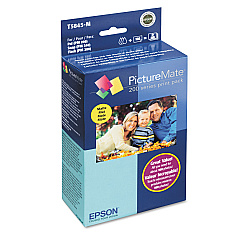
Epson PictureMate Show - PM300 Color Ink Cartridges

  • Epson T5845-M Print Pack

    Item T5845-M

    Epson T5845-M Print Pack

    PictureMate Print Pack; Contains 1 Ink Cartridge, 100 Sheets of Matte 4" x 6" Ph..

    Status

    In Stock

    $36.54

  • Epson T5846 Print Pack

    Item T5846

    Epson T5846 Print Pack

    PictureMate Print Pack; Contains 1 Ink Cartridge, 150 Sheets of Glossy 4" x 6" P..

    Status

    In Stock

    $43.04

Discover premium-quality prints with Epson PictureMate Show - PM300 Ink Cartridges. These specialized cartridges, including the Epson T5845-M Print Pack and Epson T5846 Print Pack, are designed to deliver vibrant, long-lasting photos that capture your memories in stunning detail. The PictureMate Show PM300 printer combines convenience with professional-grade output, making it ideal for home users, photographers, and small businesses alike. With these genuine Epson ink cartridges, you'll enjoy smudge-resistant, water-resistant, and fade-resistant prints that maintain their brilliance for generations. Each cartridge is optimized for use with the PictureMate Show PM300, ensuring consistent performance and exceptional image quality. Whether you're printing family photos, event snapshots, or professional portfolios, these ink cartridges provide the reliability and superior results you expect from Epson. Elevate your printing experience with Epson PictureMate Show - PM300 Ink Cartridges and bring your memories to life.

Epson PictureMate Show - PM300 Ink Cartridges FAQs

  • What is the difference between the Epson T5845-M and T5846 Print Packs?

    The Epson T5845-M Print Pack is designed for matte finish prints, while the T5846 Print Pack is for glossy finish prints.

  • How many prints can I get from one cartridge?

    Each print pack typically yields about 150 4x6 inch photos, depending on usage and image content.

  • Are these cartridges compatible with other Epson printers?

    No, these cartridges are specifically designed for use with the Epson PictureMate Show PM300 printer.

  • How long do prints last when using these cartridges?

    Prints can last up to 200 years in album storage and up to 100 years under glass, depending on environmental conditions.

  • Can I use third-party ink cartridges with the PictureMate Show PM300?

    While third-party cartridges may work, using genuine Epson cartridges ensures the best print quality and printer performance.

  • How do I install the ink cartridge in my PictureMate Show PM300?

    Open the cartridge door, remove the old cartridge, insert the new one until it clicks, and close the door. The printer will recognize the new cartridge automatically.

  • Are these cartridges environmentally friendly?

    Epson cartridges are designed to be recyclable, and Epson offers a cartridge recycling program in many regions.

  • How should I store unused ink cartridges?

    Store cartridges in a cool, dry place at room temperature. Keep them in their original packaging until ready for use.

  • Can I refill these ink cartridges?

    Epson does not recommend refilling cartridges as it may affect print quality and potentially damage the printer.

  • What should I do if my printer doesn't recognize the new cartridge?

    Ensure the cartridge is properly seated and locked in place. If issues persist, clean the cartridge contacts and try reinserting it.

Warehouse Locations

Policy & Agreement | Copyright © 1995-2026 BlueDogInk.com
