





Ads

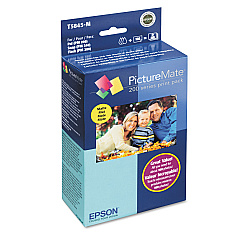
Epson PictureMate PM210 Color Ink Cartridges

  • Epson T5845-M Print Pack

    Item T5845-M

    Epson T5845-M Print Pack

    PictureMate Print Pack; Contains 1 Ink Cartridge, 100 Sheets of Matte 4" x 6" Ph..

    Status

    In Stock

    $36.54

  • Epson T5846 Print Pack

    Item T5846

    Epson T5846 Print Pack

    PictureMate Print Pack; Contains 1 Ink Cartridge, 150 Sheets of Glossy 4" x 6" P..

    Status

    In Stock

    $43.04

Enhance your photo printing experience with genuine Epson PictureMate PM210 Ink Cartridges. These high-quality cartridges are specifically designed for the Epson PictureMate PM210 printer, ensuring optimal performance and stunning results. Choose between the Epson T5845-M Print Pack and the Epson T5846 Print Pack to meet your printing needs. Both options deliver vibrant colors, sharp details, and long-lasting prints that resist fading. The Epson PictureMate PM210 Ink Cartridges are easy to install and provide consistent, professional-quality output for all your cherished memories. Whether you're printing family photos, special events, or creative projects, these cartridges offer reliability and excellence. Trust in Epson's advanced ink technology to bring your images to life with exceptional clarity and brilliance. Upgrade your printing experience today with genuine Epson PictureMate PM210 Ink Cartridges and enjoy beautiful, lab-quality photos from the comfort of your home.

Epson PictureMate PM210 Ink Cartridges FAQs

  • What is the difference between the Epson T5845-M and T5846 Print Packs?

    The main difference is the quantity of prints they yield. The specific yield may vary, so check the product details for exact information.

  • Are these ink cartridges compatible with other Epson printers?

    No, these cartridges are specifically designed for the Epson PictureMate PM210 printer and may not be compatible with other models.

  • How long do the prints last?

    Prints made with these cartridges are designed to be long-lasting and resist fading for many years when properly stored.

  • Can I use third-party ink cartridges in my Epson PictureMate PM210?

    While third-party cartridges may work, using genuine Epson cartridges ensures the best print quality and protects your printer's warranty.

  • How do I install these ink cartridges?

    Installation is simple. Open the cartridge compartment, remove the old cartridge, and insert the new one until it clicks into place. Follow the printer's on-screen instructions for any additional steps.

  • What size photos can I print with these cartridges?

    The Epson PictureMate PM210 typically prints 4x6 inch photos, but check your printer's specifications for all supported sizes.

  • How many prints can I get from one cartridge?

    The number of prints varies depending on the specific cartridge and your printing habits. Check the product description for estimated yield information.

  • Do these cartridges come with photo paper?

    Some print packs may include photo paper. Check the specific product description to confirm what's included in your purchase.

  • Are these cartridges environmentally friendly?

    Epson is committed to environmental sustainability. These cartridges can be recycled through Epson's cartridge recycling program.

  • What should I do if my prints are not coming out correctly?

    First, ensure the cartridge is properly installed. If issues persist, run a nozzle check and cleaning cycle through your printer's maintenance menu. If problems continue, contact Epson support.

Warehouse Locations

Policy & Agreement | Copyright © 1995-2026 BlueDogInk.com
