
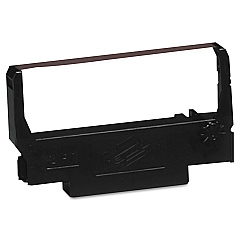
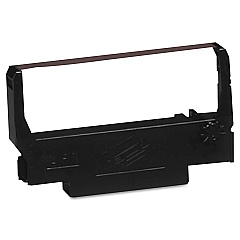





Epson M 52-JB Retail Equip. POS/Cash Reg. Supplies

Ads

Epson M 52-JB POS Printer Ribbon

Ensure smooth operations at your point-of-sale with Epson M 52-JB Retail Equip. POS/Cash Reg. Supplies. These high-quality supplies are designed specifically for Epson M 52-JB systems, guaranteeing optimal performance and longevity. Compatible with both Epson ERC-38 Black Red Ribbon Cartridge and Epson ERC-38 Black Ribbon Cartridge, these supplies offer versatility for various printing needs. The black and red ribbon option allows for eye-catching emphasis on important information, while the black-only cartridge provides crisp, clear text for standard receipts and reports. Ideal for retail stores, restaurants, and other businesses relying on efficient POS systems, these supplies ensure consistent, professional-looking output. With easy installation and long-lasting performance, Epson M 52-JB Retail Equip. POS/Cash Reg. Supplies help minimize downtime and maximize productivity in your fast-paced business environment.

Epson M 52-JB Retail Equip. POS/Cash Reg. Supplies FAQs

  • What types of businesses can use Epson M 52-JB Retail Equip. POS/Cash Reg. Supplies?

    These supplies are suitable for various businesses including retail stores, restaurants, cafes, and any establishment using Epson M 52-JB POS systems.

  • Are these supplies compatible with other Epson POS models?

    These supplies are specifically designed for the Epson M 52-JB model. For compatibility with other models, please check the product specifications or contact customer support.

  • How long does a typical ribbon cartridge last?

    The lifespan of a ribbon cartridge depends on usage, but on average, it can last for about 3 million characters.

  • Can I use third-party ribbon cartridges with my Epson M 52-JB system?

    While third-party cartridges may work, using genuine Epson supplies ensures optimal performance and prevents potential damage to your POS system.

  • How do I install a new ribbon cartridge?

    Installation is simple: open the printer cover, remove the old cartridge, insert the new one until it clicks into place, and close the cover. Detailed instructions are included with each cartridge.

  • What's the difference between the black-only and black-red ribbon cartridges?

    The black-only cartridge prints in black ink, while the black-red cartridge allows for two-color printing, useful for highlighting specific information on receipts or reports.

  • Are these supplies environmentally friendly?

    Epson strives to produce environmentally responsible products. However, for specific details on the environmental impact of these supplies, please refer to Epson's environmental policy.

  • Can I recycle used ribbon cartridges?

    Yes, Epson offers a recycling program for used cartridges. Check Epson's website for details on how to participate in their recycling initiatives.

  • How often should I replace the ribbon cartridge?

    Replace the cartridge when print quality diminishes or becomes faint. This varies based on usage, but regular inspection of print quality will help determine when replacement is necessary.

  • Do these supplies come with a warranty?

    Yes, Epson provides a warranty for defects in materials and workmanship. Please refer to the product packaging or Epson's website for specific warranty details.

Warehouse Locations

Policy & Agreement | Copyright © 1995-2026 BlueDogInk.com
