




Digital Check Tellerscan 400 ES Financial/Bank Machines Supplies

Ads

Digital Check Tellerscan 400 ES Black Ink Cartridges

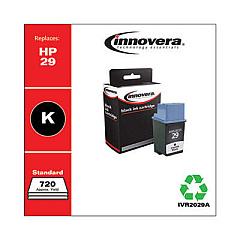
Ensure uninterrupted operation of your check scanning equipment with Digital Check Tellerscan 400 ES Ink Cartridges. These high-quality cartridges are designed specifically for the Tellerscan 400 ES model, guaranteeing optimal performance and crisp, clear imprints. Compatible options like the Innovera Remanufactured Black Ink, Replacement for 29 (51629A), offer a cost-effective alternative without compromising on quality. These cartridges deliver consistent, smudge-free results, essential for accurate check processing in financial institutions, businesses, and government offices. By choosing reliable Digital Check Tellerscan 400 ES Ink Cartridges, you'll maximize efficiency, reduce downtime, and maintain compliance with banking regulations. Whether you're handling high volumes of checks or occasional transactions, these cartridges ensure your Tellerscan 400 ES operates at peak performance, streamlining your check processing workflow and enhancing overall productivity.

Digital Check Tellerscan 400 ES Financial/Bank Machines Supplies FAQs

  • How often should I replace the ink cartridge in my Digital Check Tellerscan 400 ES?

    Replacement frequency depends on usage, but typically every 3-6 months or when print quality diminishes.

  • Are remanufactured ink cartridges compatible with the Tellerscan 400 ES?

    Yes, remanufactured cartridges like the Innovera Replacement for 29 (51629A) are compatible and offer a cost-effective alternative.

  • How many checks can I scan with one ink cartridge?

    On average, one cartridge can handle approximately 8,000-10,000 checks, depending on the amount of ink used per check.

  • Will using non-OEM ink cartridges void my Tellerscan 400 ES warranty?

    Generally, using non-OEM cartridges doesn't void the warranty, but it's best to check your specific warranty terms.

  • How do I install a new ink cartridge in the Tellerscan 400 ES?

    Open the scanner's ink cartridge compartment, remove the old cartridge, insert the new one until it clicks, and close the compartment.

  • Can I refill my Tellerscan 400 ES ink cartridges?

    While possible, it's not recommended as it may affect print quality and potentially damage the scanner.

  • What should I do if my Tellerscan 400 ES isn't recognizing the new ink cartridge?

    Ensure the cartridge is properly seated, clean the contacts, and restart the scanner. If issues persist, contact Digital Check support.

  • Are there any special storage requirements for Tellerscan 400 ES ink cartridges?

    Store cartridges in a cool, dry place at room temperature. Avoid extreme temperatures and direct sunlight.

  • How can I tell if my Tellerscan 400 ES ink cartridge is running low?

    The scanner software typically provides low ink warnings. You may also notice faded or incomplete imprints on checks.

  • Can I use the same ink cartridge for both the Tellerscan 400 ES and other printers?

    No, the Tellerscan 400 ES uses specific cartridges that are not compatible with standard printers.

Warehouse Locations

Policy & Agreement | Copyright © 1995-2026 BlueDogInk.com
