




Digital Check Tellerscan 350 EBS Financial/Bank Machines Supplies

Ads

Digital Check Tellerscan 350 EBS Black Ink Cartridges

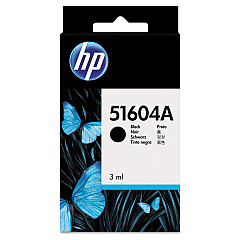
Ensure uninterrupted operation of your check scanning system with Digital Check Tellerscan 350 EBS Ink Cartridges. These high-quality ink cartridges are specifically designed for use in Digital Check Tellerscan 350 EBS machines, providing crisp, clear endorsements on checks and other financial documents. Compatible options include the original HP 51604A Black Ink Cartridge and the cost-effective Innovera Remanufactured Black Ink, a reliable replacement for 51604A. Both cartridges deliver consistent print quality and optimal performance, ensuring your financial institution maintains efficient and accurate check processing. By choosing these cartridges, you'll benefit from extended print life, reduced downtime, and superior image quality. Whether you opt for the genuine HP cartridge or the economical Innovera alternative, you can trust that your Digital Check Tellerscan 350 EBS will continue to operate at peak efficiency, streamlining your check processing workflow.

Digital Check Tellerscan 350 EBS Financial/Bank Machines Supplies FAQs

  • What is the page yield of these ink cartridges?

    The page yield varies depending on usage, but typically ranges from 500 to 1000 endorsements per cartridge.

  • Are these cartridges compatible with other Digital Check models?

    These cartridges are specifically designed for the Tellerscan 350 EBS model. Always check your device's compatibility before purchasing.

  • How long do these ink cartridges last?

    The lifespan of the cartridge depends on usage frequency, but under normal conditions, they can last several months.

  • Is there a difference in quality between the HP and Innovera cartridges?

    While both provide good quality, the HP cartridge is the original equipment manufacturer (OEM) product, which may offer slightly better consistency.

  • Can I use these cartridges for other printing purposes?

    These cartridges are designed specifically for check endorsement in the Tellerscan 350 EBS and are not recommended for general printing purposes.

  • How do I install the ink cartridge in my Tellerscan 350 EBS?

    Refer to your device's user manual for specific instructions, but generally, it involves opening the cartridge compartment, removing the old cartridge, and inserting the new one.

  • Are these cartridges environmentally friendly?

    The Innovera remanufactured cartridge is more environmentally friendly as it reuses cartridge components, reducing waste.

  • What should I do if the print quality deteriorates?

    First, try cleaning the print head using the device's maintenance functions. If the issue persists, you may need to replace the cartridge.

  • Can I refill these cartridges myself?

    It's not recommended to refill these cartridges yourself as it may affect print quality and potentially damage your device.

  • How should I store unused ink cartridges?

    Store cartridges in a cool, dry place in their original packaging. Avoid extreme temperatures and direct sunlight.

Warehouse Locations

Policy & Agreement | Copyright © 1995-2026 BlueDogInk.com
