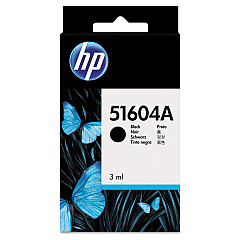





Digital Check Tellerscan 200 Financial/Bank Machines Supplies

Ads

Digital Check Tellerscan 200 Black Ink Cartridges

Ensure uninterrupted check processing with Digital Check Tellerscan 200 Ink Cartridges. These high-quality cartridges are designed specifically for the Tellerscan 200 scanner, providing crisp, clear imprints for accurate and efficient check processing. Compatible options include the original HP 51604A Black Ink Cartridge and the cost-effective Innovera Remanufactured Black Ink, a reliable replacement for 51604A. Both cartridges deliver consistent performance, producing sharp, smudge-resistant prints that meet banking industry standards. Whether you're in finance, healthcare, or government sectors, these ink cartridges offer the reliability and longevity needed for high-volume check scanning operations. Choose Digital Check Tellerscan 200 Ink Cartridges to maintain optimal performance of your check scanning equipment, ensuring compliance with regulations and streamlining your financial processes. Trust in the quality and compatibility of these cartridges to keep your business running smoothly.

Digital Check Tellerscan 200 Financial/Bank Machines Supplies FAQs

  • What is the page yield of the HP 51604A Black Ink Cartridge?

    The HP 51604A Black Ink Cartridge typically yields around 3 million characters.

  • Is the Innovera Remanufactured Black Ink compatible with the Digital Check Tellerscan 200?

    Yes, the Innovera Remanufactured Black Ink is fully compatible with the Digital Check Tellerscan 200 scanner.

  • How often should I replace the ink cartridge in my Tellerscan 200?

    Replacement frequency depends on usage, but typically every 3-6 months for high-volume operations.

  • Can I use non-OEM ink cartridges in my Digital Check Tellerscan 200?

    Yes, compatible cartridges like the Innovera Remanufactured Black Ink can be used without voiding the scanner's warranty.

  • What's the difference between HP 51604A and Innovera Remanufactured ink?

    The HP 51604A is the original equipment manufacturer cartridge, while the Innovera is a remanufactured alternative offering similar quality at a lower cost.

  • How do I install a new ink cartridge in the Tellerscan 200?

    Open the scanner's ink cartridge compartment, remove the old cartridge, insert the new one, and close the compartment. Refer to the user manual for detailed instructions.

  • Are these ink cartridges compliant with banking regulations?

    Yes, both the HP 51604A and Innovera Remanufactured ink cartridges meet banking industry standards for check processing.

  • Can I recycle used ink cartridges?

    Yes, many office supply stores and manufacturers offer recycling programs for used ink cartridges.

  • What should I do if the print quality deteriorates?

    First, try cleaning the print head using the scanner's maintenance functions. If the issue persists, replace the ink cartridge.

  • Do these ink cartridges work with other Digital Check scanner models?

    While designed for the Tellerscan 200, these cartridges may be compatible with other Digital Check models. Check your scanner's specifications to confirm compatibility.

Warehouse Locations

Policy & Agreement | Copyright © 1995-2026 BlueDogInk.com
