




Ads

Diconix Kodak 150 Black Ink Cartridges

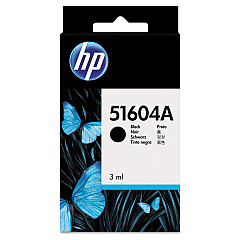
Enhance your printing experience with Diconix Kodak 150 Ink Cartridges, designed to deliver exceptional quality and reliability. These cartridges are compatible with the HP 51604A Black Ink Cartridge and the Innovera Remanufactured Black Ink, offering a perfect replacement for the original 51604A. Whether you're in a business, educational, healthcare, or government setting, these ink cartridges ensure crisp, professional-looking documents every time. The Diconix Kodak 150 Ink Cartridges are engineered to provide consistent performance, allowing you to print with confidence. With their high-yield capacity, you'll enjoy extended printing sessions without frequent cartridge changes. Experience the perfect balance of affordability and quality with these reliable ink cartridges, specifically designed to meet the demands of your Diconix Kodak 150 printer. Upgrade your printing supplies today and witness the difference in your output.

Diconix Kodak 150 Ink Cartridges FAQs

  • Are Diconix Kodak 150 Ink Cartridges compatible with other printer models?

    Diconix Kodak 150 Ink Cartridges are specifically designed for use with the Diconix Kodak 150 printer. They may not be compatible with other printer models.

  • How long do these ink cartridges typically last?

    The lifespan of the cartridges depends on usage, but they generally offer a high yield for extended printing sessions.

  • Can I use remanufactured cartridges in my Diconix Kodak 150 printer?

    Yes, remanufactured cartridges like the Innovera Remanufactured Black Ink are compatible with the Diconix Kodak 150 printer.

  • What's the difference between HP 51604A and Innovera Remanufactured cartridges?

    HP 51604A is the original manufacturer's cartridge, while Innovera offers a remanufactured alternative that's often more cost-effective.

  • Are these cartridges environmentally friendly?

    Remanufactured cartridges like the Innovera option are more environmentally friendly as they reuse cartridge components.

  • How do I install the ink cartridge in my Diconix Kodak 150 printer?

    Refer to your printer's manual for specific instructions, but generally, you'll need to open the printer, remove the old cartridge, and insert the new one until it clicks into place.

  • What should I do if my prints are coming out faded or streaky?

    Try cleaning the print heads using your printer's maintenance function. If the problem persists, you may need to replace the ink cartridge.

  • Can I refill these ink cartridges myself?

    While it's possible to refill cartridges, it's not recommended as it can lead to print quality issues and potential printer damage.

  • How should I store unused ink cartridges?

    Store cartridges in a cool, dry place in their original packaging until ready for use. Avoid extreme temperatures and direct sunlight.

  • Do these cartridges come with a warranty?

    Warranty terms may vary. Original HP cartridges typically come with a warranty, while terms for remanufactured cartridges may differ. Check the product details for specific warranty information.

Warehouse Locations

Policy & Agreement | Copyright © 1995-2026 BlueDogInk.com
