





Ads

Dell V305 W Color Ink Cartridges

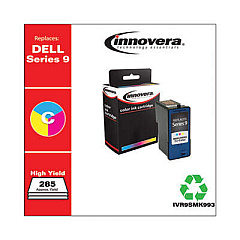
Ensure your Dell V305 W printer continues to deliver exceptional prints with our premium Dell V305 W Ink Cartridges. These high-quality cartridges, including the Innovera Remanufactured Tri-Color High-Yield Ink, are designed to seamlessly replace the Series 9 (MK991) cartridges, offering optimal performance and vibrant color output. Perfect for businesses, educational institutions, government offices, and healthcare facilities, these cartridges provide consistent, professional-grade results for all your printing needs. Our Dell V305 W Ink Cartridges are engineered to meet rigorous standards, ensuring compatibility and reliability with your printer. By choosing our cartridges, you'll benefit from cost-effective printing solutions without compromising on quality. Experience the perfect balance of affordability and performance with our extensive range of Dell V305 W Ink Cartridges, tailored to meet the demands of high-volume printing environments.

Dell V305 W Ink Cartridges FAQs

  • Are these ink cartridges compatible with the Dell V305 W printer?

    Yes, these ink cartridges are specifically designed for use with the Dell V305 W printer.

  • What is the difference between OEM and remanufactured cartridges?

    OEM cartridges are made by the original equipment manufacturer, while remanufactured cartridges are recycled and refilled by third-party companies.

  • How long do these ink cartridges typically last?

    The lifespan of the cartridges depends on usage, but they generally last for several hundred pages of printing.

  • Are these cartridges environmentally friendly?

    Yes, remanufactured cartridges like the Innovera Tri-Color High-Yield Ink help reduce waste by recycling and reusing cartridge components.

  • Do these cartridges come with a warranty?

    Yes, most remanufactured cartridges come with a warranty. Please check the specific product details for warranty information.

  • How do I install these ink cartridges in my Dell V305 W printer?

    Installation is simple. Open the printer's cartridge access door, remove the old cartridge, and insert the new one until it clicks into place.

  • Can I use these cartridges in other Dell printer models?

    These cartridges are specifically designed for the Dell V305 W. They may not be compatible with other Dell printer models.

  • What should I do if I experience print quality issues with these cartridges?

    First, try cleaning the print heads. If issues persist, contact our customer support for assistance.

  • How should I store unused ink cartridges?

    Store cartridges in a cool, dry place away from direct sunlight. Keep them in their original packaging until ready for use.

  • Do you offer bulk discounts for these ink cartridges?

    Yes, we offer discounts for bulk purchases. Please contact our sales team for more information on volume pricing.

Warehouse Locations

Policy & Agreement | Copyright © 1995-2026 BlueDogInk.com
