





Ads

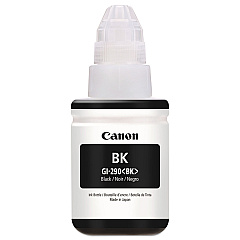
Canon PIXMA G3501 Black Ink Cartridges

Discover unparalleled printing efficiency with Canon PIXMA G3501 Ink Cartridges. This innovative MegaTank printer is designed for high-volume printing, making it ideal for businesses, schools, healthcare facilities, and government offices. The G3501 utilizes the Canon GI-290 Black Ink Bottle, delivering crisp, professional-quality text and graphics. With its refillable ink tank system, you'll enjoy significant cost savings and reduced waste compared to traditional cartridges. The high-capacity ink bottles ensure extended periods between refills, minimizing downtime and maximizing productivity. Whether you're printing reports, educational materials, or official documents, the Canon PIXMA G3501 Ink Cartridges provide reliable, smudge-resistant results. Experience the convenience of wireless printing and seamless integration with mobile devices, making it easier than ever to meet your diverse printing needs. Upgrade your printing capabilities with the Canon PIXMA G3501 and its efficient ink system today.

Canon PIXMA G3501 Ink Cartridges FAQs

  • How long does a Canon GI-290 Black Ink Bottle last?

    A Canon GI-290 Black Ink Bottle can print approximately 6,000 pages, depending on usage and print settings.

  • Is the Canon PIXMA G3501 compatible with third-party ink?

    While third-party ink may work, it's recommended to use genuine Canon ink to ensure optimal print quality and to maintain your printer's warranty.

  • How do I refill the ink in my Canon PIXMA G3501?

    To refill, simply open the ink tank cover, remove the bottle cap, insert the bottle nozzle into the tank, and let the ink flow until the tank is full.

  • Can I use the Canon PIXMA G3501 for photo printing?

    Yes, the G3501 is capable of producing high-quality photo prints, especially when using Canon photo paper.

  • How often do I need to replace the ink bottles in the Canon PIXMA G3501?

    Replacement frequency depends on usage, but typically, ink bottles last several months to a year for average users.

  • Does the Canon PIXMA G3501 support wireless printing?

    Yes, the G3501 supports wireless printing, allowing you to print from computers, smartphones, and tablets.

  • What is the print resolution of the Canon PIXMA G3501?

    The G3501 offers a maximum print resolution of 4800 x 1200 dpi for high-quality outputs.

  • Can the Canon PIXMA G3501 print on both sides of the paper?

    The G3501 supports manual duplex printing, allowing you to print on both sides of the paper.

  • Is the Canon PIXMA G3501 suitable for small businesses?

    Yes, its high-capacity ink tanks and low running costs make it an excellent choice for small businesses with moderate to high print volumes.

  • What types of paper can the Canon PIXMA G3501 handle?

    The G3501 can handle various paper types, including plain paper, photo paper, envelopes, and labels.

Warehouse Locations

Policy & Agreement | Copyright © 1995-2026 BlueDogInk.com
