





Ads

Canon LR1 Printstation Color Ink Cartridges

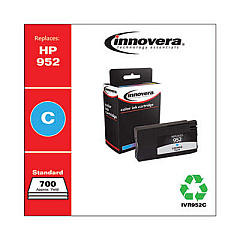
Ensure uninterrupted printing with high-quality Canon LR1 Printstation Ink Cartridges. These reliable cartridges, including the Innovera Remanufactured Cyan Ink, Replacement for 952 (L0S49AN), deliver exceptional print quality and performance for your Canon LR1 Printstation. Designed to meet the demands of businesses, educational institutions, government offices, healthcare facilities, and wholesale operations, these ink cartridges offer consistent, vibrant results page after page. With their long-lasting formula, you'll experience fewer cartridge changes and reduced downtime. The Canon LR1 Printstation Ink Cartridges are engineered to work seamlessly with your printer, ensuring optimal functionality and preventing potential damage. Choose these cartridges for crisp text, vivid colors, and professional-looking documents that make a lasting impression. Maximize your printing efficiency and minimize costs with these reliable, high-yield ink cartridges tailored for the Canon LR1 Printstation.

Canon LR1 Printstation Ink Cartridges FAQs

  • Are these ink cartridges compatible with other Canon printers?

    These cartridges are specifically designed for the Canon LR1 Printstation. Always check your printer's compatibility before purchasing.

  • How long do Canon LR1 Printstation Ink Cartridges typically last?

    The lifespan of the cartridges depends on usage, but they are designed for high-yield printing to minimize frequent replacements.

  • Can I use third-party ink cartridges in my Canon LR1 Printstation?

    While third-party cartridges may work, using genuine Canon or authorized replacements like Innovera ensures optimal performance and print quality.

  • How do I install the ink cartridges in my Canon LR1 Printstation?

    Refer to your printer's user manual for specific instructions, but generally, you'll need to open the printer, remove the old cartridge, and insert the new one until it clicks into place.

  • Are these ink cartridges environmentally friendly?

    Many cartridges, including remanufactured ones like the Innovera Cyan Ink, are designed with environmental considerations in mind and can be recycled.

  • What should I do if my printer doesn't recognize the new ink cartridge?

    Try removing and reinserting the cartridge, cleaning the contacts, or updating your printer's firmware. If issues persist, contact Canon support.

  • Can I mix different brands of ink cartridges in my Canon LR1 Printstation?

    It's generally recommended to use the same brand for all cartridges to ensure consistent print quality and avoid potential compatibility issues.

  • How can I check the ink levels in my Canon LR1 Printstation?

    Most Canon printers have a built-in ink level monitoring system accessible through the printer's display or software on your computer.

  • Are these ink cartridges covered by a warranty?

    Warranty coverage may vary. Check with the seller or manufacturer for specific warranty information on the ink cartridges.

  • Can I refill these ink cartridges myself?

    While it's possible to refill cartridges, it's not recommended as it may affect print quality and potentially damage your printer. It's best to use new, genuine cartridges.

Warehouse Locations

Policy & Agreement | Copyright © 1995-2026 BlueDogInk.com
