





Ads

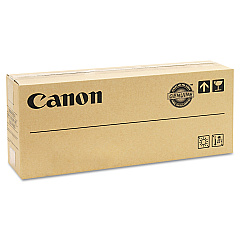
Canon imageRUNNER Advance 6565 i III Black Toner Cartridges

Ensure peak performance and exceptional print quality with Canon imageRUNNER Advance 6565 i III Toner Cartridges. These high-yield cartridges are specifically designed for the Canon imageRUNNER Advance 6565 i III, a powerhouse multifunction printer ideal for businesses, educational institutions, government offices, healthcare facilities, and wholesale operations. The Canon GPR-38 Black Toner Cartridge delivers crisp, professional-grade text and images, perfect for high-volume printing environments. With its superior formulation, this toner minimizes waste and maximizes efficiency, reducing your overall printing costs. Compatible with various Canon imageRUNNER models, these cartridges offer versatility and convenience. Invest in genuine Canon toner to maintain your printer's warranty and ensure consistent, high-quality output. Choose Canon imageRUNNER Advance 6565 i III Toner Cartridges for reliable performance and exceptional results in all your printing tasks.

Canon imageRUNNER Advance 6565 i III Toner Cartridges FAQs

  • What is the page yield of the Canon GPR-38 Black Toner Cartridge?

    The Canon GPR-38 Black Toner Cartridge typically yields approximately 56,000 pages at 5% coverage.

  • Is this toner cartridge compatible with other Canon imageRUNNER models?

    Yes, the Canon GPR-38 Black Toner Cartridge is compatible with several Canon imageRUNNER models, including the 6555i, 6565i, and 6575i.

  • How long does the Canon GPR-38 Black Toner Cartridge typically last?

    The lifespan of the cartridge depends on usage, but it generally lasts several months in a high-volume printing environment.

  • Are these genuine Canon toner cartridges?

    Yes, these are genuine Canon toner cartridges, ensuring optimal performance and maintaining your printer's warranty.

  • Can I use third-party toner cartridges in my Canon imageRUNNER Advance 6565 i III?

    While third-party cartridges may work, using genuine Canon toner is recommended to ensure optimal print quality and to maintain your printer's warranty.

  • How do I install the Canon GPR-38 Black Toner Cartridge?

    Installation is simple: open the front panel of the printer, remove the old cartridge, and insert the new one until it clicks into place. Detailed instructions are provided in the printer's manual.

  • What should I do with my empty toner cartridges?

    Canon offers a recycling program for empty toner cartridges. You can return them to Canon or participate in local recycling initiatives.

  • How can I tell if my toner cartridge is running low?

    The printer's display panel will show a low toner warning. You can also check toner levels through the printer's web interface or driver software.

  • Are these toner cartridges environmentally friendly?

    Canon designs its toner cartridges with environmental considerations in mind, using recyclable materials and offering recycling programs to minimize waste.

  • Do you offer bulk discounts for these toner cartridges?

    Yes, we offer volume discounts for bulk purchases. Please contact our sales team for more information on pricing for large orders.

Warehouse Locations

Policy & Agreement | Copyright © 1995-2026 BlueDogInk.com
