





Ads

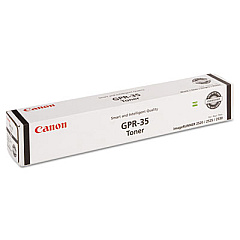
Canon imageRUNNER 2520 Black Toner Cartridges

Ensure uninterrupted productivity with genuine Canon imageRUNNER 2520 Toner Cartridges. These high-quality consumables are specifically designed for optimal performance in your Canon imageRUNNER 2520 multifunction printer. The Canon GPR-35 Black Toner Cartridge delivers crisp, professional-quality text and images, making it ideal for businesses, educational institutions, government offices, and healthcare facilities. With its impressive yield and consistent output, this toner cartridge helps reduce downtime and maintenance costs. Compatible with various imageRUNNER models, these cartridges offer versatility and convenience for your office printing needs. Choose authentic Canon toner cartridges to maintain your printer's efficiency and protect your investment. Experience the difference in print quality and reliability with Canon imageRUNNER 2520 Toner Cartridges, designed to meet the demands of high-volume printing environments while ensuring exceptional results every time.

Canon imageRUNNER 2520 Printers Supplies FAQs

  • What is the page yield of the Canon GPR-35 Black Toner Cartridge?

    The Canon GPR-35 Black Toner Cartridge typically yields approximately 14,600 pages at 5% coverage.

  • Is the Canon GPR-35 compatible with other imageRUNNER models?

    Yes, the Canon GPR-35 is compatible with several imageRUNNER models, including the 2520, 2525, and 2530.

  • How can I tell if my toner cartridge is running low?

    Your Canon imageRUNNER 2520 will display a low toner message on the control panel when the cartridge is nearing depletion.

  • Are remanufactured toner cartridges available for the imageRUNNER 2520?

    While remanufactured options may exist, using genuine Canon toner cartridges is recommended for optimal performance and print quality.

  • How should I store unused toner cartridges?

    Store unused cartridges in a cool, dry place away from direct sunlight. Keep them in their original packaging until ready for use.

  • Can I recycle used toner cartridges?

    Yes, Canon offers a recycling program for used toner cartridges. Check their website or contact your local Canon dealer for details.

  • How do I install a new toner cartridge in the imageRUNNER 2520?

    Consult your printer's user manual for step-by-step instructions on replacing the toner cartridge. Generally, it involves opening the front cover, removing the old cartridge, and inserting the new one.

  • What should I do if I experience print quality issues?

    First, ensure you're using a genuine Canon toner cartridge. If issues persist, try cleaning the printer's internal components or contact Canon support for assistance.

  • Is it safe to use third-party toner cartridges in my Canon imageRUNNER 2520?

    While third-party cartridges may work, using genuine Canon toner cartridges is recommended to ensure optimal performance, print quality, and to maintain your printer's warranty.

  • How long does a Canon GPR-35 toner cartridge typically last?

    The lifespan of a toner cartridge depends on your printing volume and habits. Under normal use, a GPR-35 cartridge can last several months to a year.

Warehouse Locations

Policy & Agreement | Copyright © 1995-2026 BlueDogInk.com
