





Ads

Canon FAX L290 Black Toner Cartridges

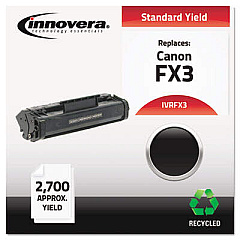
Ensure uninterrupted productivity with high-quality Canon FAX L290 Toner Cartridges. These reliable cartridges are designed to deliver crisp, clear text and images for your professional fax communications. Compatible with the Canon FAX L290 machine, these toner cartridges offer exceptional value and performance. The Innovera Remanufactured Black Toner, a replacement for the FX-3 (1557A002BA), provides an eco-friendly and cost-effective alternative without compromising on quality. With its high yield and consistent output, this toner cartridge is ideal for businesses, educational institutions, government offices, healthcare facilities, and wholesale operations that require dependable fax services. Experience reduced downtime and improved efficiency with these long-lasting cartridges. Choose Canon FAX L290 Toner Cartridges for sharp, professional-looking documents and maintain the high standards of your communication needs.

Canon FAX L290 Fax Machines Supplies FAQs

  • What is the page yield of the Canon FAX L290 Toner Cartridge?

    The page yield varies depending on the specific cartridge model, but typically ranges from 2,700 to 3,000 pages at 5% coverage.

  • Is the Innovera Remanufactured Black Toner compatible with the Canon FAX L290?

    Yes, the Innovera Remanufactured Black Toner is fully compatible with the Canon FAX L290 machine.

  • How long does a Canon FAX L290 Toner Cartridge typically last?

    The lifespan of the cartridge depends on usage, but under normal conditions, it can last several months to a year.

  • Are remanufactured toner cartridges as good as original Canon cartridges?

    High-quality remanufactured cartridges like Innovera offer comparable performance to original cartridges at a lower cost.

  • Can I recycle my used Canon FAX L290 Toner Cartridges?

    Yes, most Canon toner cartridges can be recycled. Check with your local recycling center or Canon's recycling program for details.

  • How do I install a new toner cartridge in the Canon FAX L290?

    Open the front cover, remove the old cartridge, unpack the new one, and insert it into the machine until it clicks into place.

  • What should I do if my Canon FAX L290 prints become faded?

    Faded prints often indicate low toner levels. Try redistributing the toner by gently shaking the cartridge or replace it if necessary.

  • Can I use third-party toner cartridges in my Canon FAX L290?

    While third-party cartridges may work, using high-quality compatible or remanufactured cartridges like Innovera is recommended for optimal performance.

  • How should I store unused Canon FAX L290 Toner Cartridges?

    Store cartridges in a cool, dry place away from direct sunlight. Keep them in their original packaging until ready for use.

  • What is the warranty on Innovera Remanufactured Black Toner cartridges?

    Innovera typically offers a standard warranty on their remanufactured cartridges. Check the product packaging or contact the seller for specific warranty information.

Warehouse Locations

Policy & Agreement | Copyright © 1995-2026 BlueDogInk.com
