





Ads

Canon BP 5220 D Black Ink Cartridges

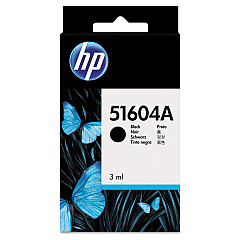
Canon BP 5220 D Ink Cartridges are essential for maintaining the high-quality output of your Canon printer. These cartridges are designed to deliver crisp, clear text and vibrant images for various professional and educational applications. Compatible with the HP 51604A Black Ink Cartridge, these cartridges ensure consistent performance and reliability. For cost-conscious consumers, the Innovera Remanufactured Black Ink offers an eco-friendly alternative without compromising on quality. This replacement for 51604A (51604A) provides excellent value while maintaining the same print standards. Whether you're printing important business documents, educational materials, or healthcare records, Canon BP 5220 D Ink Cartridges deliver the precision and durability required for professional-grade printing. With these cartridges, you can trust that your Canon BP 5220 D printer will consistently produce sharp, smudge-resistant prints that meet the demands of various industries and applications.

Canon BP 5220 D Calculators Supplies FAQs

  • What is the page yield of the Canon BP 5220 D Ink Cartridges?

    The page yield varies depending on the specific cartridge model and printing habits. For exact figures, please refer to the product specifications.

  • Are these ink cartridges compatible with other Canon printer models?

    These cartridges are specifically designed for the Canon BP 5220 D. Always check your printer's compatibility before purchasing ink cartridges.

  • How long do Canon BP 5220 D Ink Cartridges last?

    The lifespan of the cartridges depends on usage frequency and print volume. Typically, they can last several months under normal use.

  • Can I use remanufactured ink cartridges in my Canon BP 5220 D printer?

    Yes, remanufactured cartridges like the Innovera Replacement For 51604A are compatible and offer a cost-effective alternative.

  • How do I install the ink cartridges in my Canon BP 5220 D printer?

    Refer to your printer's user manual for specific instructions. Generally, you'll need to open the printer, remove the old cartridge, and insert the new one until it clicks into place.

  • Are these ink cartridges environmentally friendly?

    The remanufactured options, such as the Innovera cartridge, are more environmentally friendly as they reuse existing cartridge bodies.

  • What should I do if my prints are coming out faded or streaky?

    First, try cleaning the print heads using your printer's maintenance function. If the problem persists, you may need to replace the ink cartridge.

  • Can I refill these ink cartridges myself?

    While it's possible to refill cartridges, it's not recommended as it can lead to print quality issues and potential printer damage. It's best to use new or properly remanufactured cartridges.

  • How should I store unused ink cartridges?

    Store cartridges in a cool, dry place away from direct sunlight. Keep them in their original packaging until ready for use to prevent drying out.

  • Is there a warranty on these ink cartridges?

    Warranty terms may vary depending on the manufacturer. Original HP cartridges typically come with a warranty, while terms for remanufactured cartridges may differ. Check the product details for specific warranty information.

Warehouse Locations

Policy & Agreement | Copyright © 1995-2026 BlueDogInk.com
