





Ads

Canon BP 37 DE Black Ink Cartridges

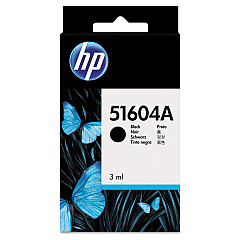
Canon BP 37 DE Ink Cartridges are essential for maintaining the high-quality output of your Canon printer. These cartridges are designed to deliver crisp, clear text and vibrant images, making them ideal for businesses, educational institutions, government offices, and healthcare facilities. Compatible with the HP 51604A Black Ink Cartridge and the Innovera Remanufactured Black Ink, Replacement For 51604A (51604A), these cartridges offer versatility and cost-effectiveness. The Canon BP 37 DE Ink Cartridges ensure consistent performance and long-lasting prints, reducing the need for frequent replacements. Whether you're printing important documents, reports, or promotional materials, these cartridges provide the reliability and quality you need. With their easy installation and compatibility with a range of Canon printers, the Canon BP 37 DE Ink Cartridges are an excellent choice for organizations looking to optimize their printing operations and maintain professional-grade output.

Canon BP 37 DE Calculators Supplies FAQs

  • What printers are compatible with Canon BP 37 DE Ink Cartridges?

    Canon BP 37 DE Ink Cartridges are compatible with various Canon printers. Please check your printer's manual or the Canon website for specific compatibility information.

  • How long do Canon BP 37 DE Ink Cartridges typically last?

    The lifespan of Canon BP 37 DE Ink Cartridges depends on usage frequency and print volume. On average, they can last for several hundred pages.

  • Are Canon BP 37 DE Ink Cartridges refillable?

    Canon does not recommend refilling these cartridges. For best results and to maintain printer warranty, use genuine Canon cartridges or approved compatible alternatives.

  • Can I use third-party ink cartridges instead of Canon BP 37 DE Ink Cartridges?

    While third-party options like the Innovera Remanufactured Black Ink are available, using non-Canon cartridges may affect print quality and could potentially void your printer's warranty.

  • How do I install Canon BP 37 DE Ink Cartridges?

    Installation is typically straightforward. Open your printer's ink cartridge compartment, remove the old cartridge, and insert the new Canon BP 37 DE Ink Cartridge until it clicks into place.

  • What should I do if my printer doesn't recognize the Canon BP 37 DE Ink Cartridge?

    Try removing and reinserting the cartridge. If the issue persists, clean the cartridge contacts and try again. If problems continue, contact Canon support.

  • Are Canon BP 37 DE Ink Cartridges environmentally friendly?

    Canon has recycling programs for used ink cartridges. Check Canon's website for information on how to recycle your used Canon BP 37 DE Ink Cartridges.

  • How should I store unused Canon BP 37 DE Ink Cartridges?

    Store unused cartridges in a cool, dry place away from direct sunlight. Keep them in their original packaging until ready for use.

  • What's the difference between Canon BP 37 DE Ink Cartridges and HP 51604A Black Ink Cartridge?

    While both are compatible with certain Canon printers, the Canon BP 37 DE is a genuine Canon product, while the HP 51604A is a compatible alternative from HP.

  • Do Canon BP 37 DE Ink Cartridges come with a warranty?

    Yes, genuine Canon BP 37 DE Ink Cartridges typically come with a limited warranty. Check the packaging or Canon's website for specific warranty information.

Warehouse Locations

Policy & Agreement | Copyright © 1995-2026 BlueDogInk.com
