





Ads

Canon BP 35 D Black Ink Cartridges

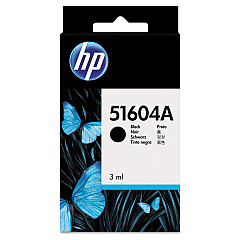
Canon BP 35 D Ink Cartridges are essential for maintaining the high-quality output of your Canon BP 35 D printer. These cartridges are designed to deliver crisp, clear text and vibrant images for all your printing needs. Compatible options include the HP 51604A Black Ink Cartridge, known for its reliability and consistent performance. For a cost-effective alternative, consider the Innovera Remanufactured Black Ink, a replacement for 51604A that offers comparable quality at a lower price point. These cartridges are ideal for businesses, educational institutions, government offices, and healthcare facilities that require dependable printing solutions. Whether you're printing important documents, reports, or correspondence, Canon BP 35 D Ink Cartridges ensure professional results every time. Choose the cartridge that best suits your budget and printing volume to keep your Canon BP 35 D printer running smoothly and efficiently.

Canon BP 35 D Calculators Supplies FAQs

  • What is the page yield of the Canon BP 35 D Ink Cartridges?

    The page yield varies depending on the specific cartridge model and printing habits, but typically ranges from 500 to 800 pages.

  • Are remanufactured cartridges compatible with the Canon BP 35 D printer?

    Yes, remanufactured cartridges like the Innovera Replacement For 51604A are compatible and offer a cost-effective alternative.

  • How long do Canon BP 35 D Ink Cartridges last?

    The lifespan of the cartridges depends on usage, but they typically last 3-6 months under normal printing conditions.

  • Can I use non-Canon brand cartridges in my Canon BP 35 D printer?

    Yes, compatible cartridges like the HP 51604A and Innovera Remanufactured Black Ink can be used in the Canon BP 35 D printer.

  • How do I install Canon BP 35 D Ink Cartridges?

    Open the printer cover, remove the old cartridge, insert the new cartridge until it clicks into place, and close the cover. Refer to your printer manual for detailed instructions.

  • Are Canon BP 35 D Ink Cartridges environmentally friendly?

    Many cartridges can be recycled. Check with the manufacturer or local recycling centers for proper disposal methods.

  • What should I do if my Canon BP 35 D printer doesn't recognize the new ink cartridge?

    Try removing and reinserting the cartridge, cleaning the contacts, or updating your printer's firmware. If issues persist, contact Canon support.

  • Can I refill Canon BP 35 D Ink Cartridges myself?

    While it's possible to refill cartridges, it's not recommended as it may affect print quality and potentially damage your printer.

  • How can I extend the life of my Canon BP 35 D Ink Cartridges?

    Print only when necessary, use draft mode for non-essential documents, and store cartridges properly when not in use.

  • Do Canon BP 35 D Ink Cartridges come with a warranty?

    Original Canon cartridges typically come with a limited warranty. For third-party options, check with the specific manufacturer for warranty information.

Warehouse Locations

Policy & Agreement | Copyright © 1995-2026 BlueDogInk.com
