





Ads

Canon BP 26 D Black Ink Cartridges

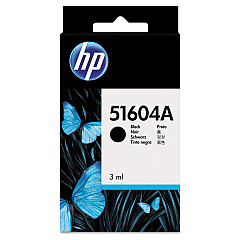
Canon BP 26 D Ink Cartridges are essential for maintaining the high-quality output of your Canon BP 26 D printer. These reliable cartridges ensure crisp, clear text and vibrant images for all your printing needs. Compatible options include the HP 51604A Black Ink Cartridge, known for its consistent performance and long-lasting results. For a cost-effective alternative, consider the Innovera Remanufactured Black Ink, a replacement for 51604A that delivers comparable quality at a fraction of the price. Whether you're printing important business documents, educational materials, or healthcare records, Canon BP 26 D Ink Cartridges provide the dependable performance you need. With these cartridges, you can count on sharp, professional-looking prints every time. Choose the ink option that best suits your budget and printing requirements to keep your Canon BP 26 D running smoothly and efficiently.

Canon BP 26 D Calculators Supplies FAQs

  • What is the page yield of Canon BP 26 D Ink Cartridges?

    The page yield varies depending on the specific cartridge model and printing habits. Check the product specifications for exact yield information.

  • Are remanufactured ink cartridges compatible with the Canon BP 26 D printer?

    Yes, remanufactured cartridges like the Innovera Replacement For 51604A are compatible and offer a cost-effective alternative.

  • How long do Canon BP 26 D Ink Cartridges last?

    The lifespan of the cartridges depends on usage frequency and print volume. On average, they can last several months under normal use.

  • Can I use HP 51604A Black Ink Cartridge in my Canon BP 26 D printer?

    Yes, the HP 51604A Black Ink Cartridge is compatible with the Canon BP 26 D printer.

  • How do I install Canon BP 26 D Ink Cartridges?

    Refer to your printer's user manual for specific installation instructions, as the process may vary slightly between models.

  • Are Canon BP 26 D Ink Cartridges available in colors other than black?

    The Canon BP 26 D primarily uses black ink cartridges. Color options may be limited or unavailable for this specific model.

  • What should I do if my Canon BP 26 D Ink Cartridge is not recognized by the printer?

    Try removing and reinserting the cartridge, cleaning the contacts, or updating your printer's firmware. If issues persist, contact Canon support.

  • Can I refill Canon BP 26 D Ink Cartridges myself?

    While it's possible to refill cartridges, it's not recommended as it may affect print quality and potentially damage your printer.

  • How do I properly store unused Canon BP 26 D Ink Cartridges?

    Store cartridges in a cool, dry place, away from direct sunlight. Keep them in their original packaging until ready for use.

  • Are there any environmental benefits to using remanufactured ink cartridges?

    Yes, remanufactured cartridges like the Innovera option help reduce waste by reusing cartridge components, making them a more environmentally friendly choice.

Warehouse Locations

Policy & Agreement | Copyright © 1995-2026 BlueDogInk.com
