





Ads

Canon BN700C Model 2 Color Ink Cartridges

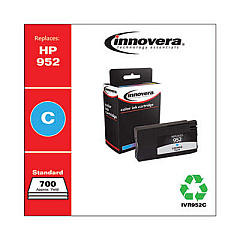
Enhance your printing experience with Canon BN700C Model 2 Ink Cartridges, designed to deliver exceptional quality and reliability for your Canon printer. These high-performance cartridges, including the Innovera Remanufactured Cyan Ink, Replacement for 952 (L0S49AN), ensure vibrant, long-lasting prints for all your business, educational, or healthcare needs. Compatible with a range of Canon printers, these cartridges offer consistent color accuracy and sharp text, making them ideal for professional documents, presentations, and marketing materials. Engineered to meet Canon's strict quality standards, these cartridges provide optimal page yield and reduced waste, contributing to both cost-effectiveness and environmental sustainability. Whether you're printing high-volume reports or colorful graphics, Canon BN700C Model 2 Ink Cartridges deliver the performance and reliability you need to keep your operations running smoothly.

Canon BN700C Model 2 Ink Cartridges FAQs

  • What printers are compatible with Canon BN700C Model 2 Ink Cartridges?

    Canon BN700C Model 2 Ink Cartridges are compatible with select Canon printers. Please check your printer's manual or the product specifications for exact compatibility.

  • How long do these ink cartridges typically last?

    The lifespan of the cartridges depends on usage, but they are designed for high-yield printing. On average, they can produce several hundred pages before needing replacement.

  • Are these cartridges environmentally friendly?

    Yes, these cartridges are designed to minimize waste and can be recycled through Canon's recycling program, contributing to environmental sustainability.

  • Can I use third-party ink cartridges with my Canon printer?

    While third-party cartridges like the Innovera Remanufactured Cyan Ink are available, using genuine Canon cartridges ensures optimal performance and maintains your printer's warranty.

  • How do I install these ink cartridges?

    Installation is simple. Open your printer's ink cartridge compartment, remove the old cartridge, and insert the new one until it clicks into place. Refer to your printer's manual for specific instructions.

  • What colors are available in the Canon BN700C Model 2 Ink Cartridges series?

    The series typically includes cyan, magenta, yellow, and black cartridges. Always check the specific product listing for available colors.

  • Do these cartridges come with a warranty?

    Yes, genuine Canon ink cartridges come with a warranty. The terms may vary, so please check the packaging or Canon's website for detailed warranty information.

  • How can I tell if my ink cartridge is running low?

    Most Canon printers have built-in ink level indicators. You can check ink levels through your printer's display or your computer's printer software.

  • Are these cartridges suitable for photo printing?

    Yes, Canon BN700C Model 2 Ink Cartridges are designed to produce high-quality prints, including photos, with vibrant colors and sharp details.

  • Can I buy these cartridges in bulk for my business?

    Yes, many suppliers offer bulk purchasing options for businesses. Contact the seller or Canon directly for information on bulk orders and potential discounts.

Warehouse Locations

Policy & Agreement | Copyright © 1995-2026 BlueDogInk.com
