





Ads

Canon BN200C Color Ink Cartridges

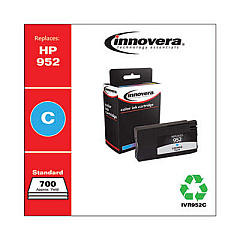
Canon BN200C Ink Cartridges are essential for maintaining the high-quality output of your Canon printer. These cartridges are designed to deliver crisp, vibrant prints for businesses, educational institutions, government offices, healthcare facilities, and wholesale operations. The Innovera Remanufactured Cyan Ink, a replacement for the 952 (L0S49AN) cartridge, offers a cost-effective alternative without compromising on quality. This eco-friendly option helps reduce waste while ensuring your prints remain professional and eye-catching. Canon BN200C Ink Cartridges are known for their reliability, long-lasting performance, and compatibility with a wide range of Canon printer models. Whether you're printing important documents, presentations, or marketing materials, these cartridges provide consistent color accuracy and sharp text. Invest in Canon BN200C Ink Cartridges to keep your printing operations running smoothly and efficiently.

Canon BN200C Ink Cartridges FAQs

  • Are Canon BN200C Ink Cartridges compatible with all Canon printers?

    No, Canon BN200C Ink Cartridges are designed for specific Canon printer models. Check your printer's manual or the Canon website for compatibility information.

  • How long do Canon BN200C Ink Cartridges typically last?

    The lifespan of a cartridge depends on usage, but on average, they can print between 700-1,000 pages.

  • Can I use remanufactured ink cartridges in my Canon printer?

    Yes, remanufactured cartridges like the Innovera Cyan Ink are compatible with Canon printers and offer a cost-effective alternative.

  • How do I install Canon BN200C Ink Cartridges?

    Open your printer's ink cartridge compartment, remove the old cartridge, and insert the new one until it clicks into place. Follow your printer's manual for specific instructions.

  • Are Canon BN200C Ink Cartridges environmentally friendly?

    Canon has sustainability initiatives in place, and using remanufactured cartridges can help reduce waste. Always recycle used cartridges properly.

  • How can I tell if my Canon BN200C Ink Cartridge is running low?

    Most Canon printers have an ink level indicator on the display or through the printer software on your computer.

  • Can I refill Canon BN200C Ink Cartridges myself?

    While it's possible, it's not recommended as it may void your printer's warranty and potentially damage the printer or affect print quality.

  • What's the difference between OEM and remanufactured ink cartridges?

    OEM cartridges are made by Canon, while remanufactured ones like Innovera are recycled and refilled cartridges, often more affordable but with comparable quality.

  • How should I store unused Canon BN200C Ink Cartridges?

    Store them in a cool, dry place away from direct sunlight. Keep them in their original packaging until ready to use.

  • What should I do if my Canon BN200C Ink Cartridge is not recognized by the printer?

    Try removing and reinserting the cartridge, cleaning the contacts, or updating your printer's firmware. If issues persist, contact Canon support.

Warehouse Locations

Policy & Agreement | Copyright © 1995-2026 BlueDogInk.com
