





Ads

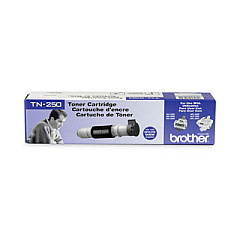
Brother MFC-9680 Black Toner Cartridges

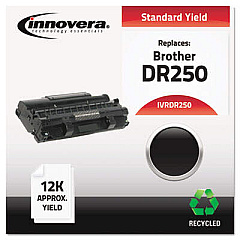
Brother MFC-9680 Drum Units

Ensure your Brother MFC-9680 multifunction printer continues to deliver exceptional print quality with our genuine Brother MFC-9680 Toner Cartridges. The Brother TN250 Black Toner Cartridge is specifically designed for optimal performance in your MFC-9680 printer, providing crisp, clear text and sharp images for all your business, educational, or healthcare printing needs. These high-yield cartridges offer cost-effective printing solutions, reducing your overall printing expenses while maintaining professional-grade output. Compatible with various Brother printer models, the TN250 cartridge guarantees consistent results and reliability. Don't compromise on quality – choose authentic Brother toner cartridges to maximize your printer's potential and extend its lifespan. Whether you're printing important documents, reports, or presentations, our Brother MFC-9680 Toner Cartridges ensure your work always looks its best.

Brother MFC-9680 Toner Cartridges FAQs

  • How long does a Brother TN250 toner cartridge typically last?

    The Brother TN250 toner cartridge typically yields approximately 2,200 pages at 5% coverage.

  • Is the Brother TN250 compatible with other printer models?

    Yes, the TN250 is compatible with several Brother printer models, including the MFC-9600, MFC-9700, and MFC-9800 series.

  • How can I tell when it's time to replace my toner cartridge?

    Your printer will display a 'Toner Low' or 'Replace Toner' message when it's time to replace the cartridge.

  • Are these genuine Brother toner cartridges?

    Yes, we offer genuine Brother toner cartridges for optimal performance and print quality.

  • What's the shelf life of an unopened toner cartridge?

    Unopened toner cartridges typically have a shelf life of 1-2 years when stored properly.

  • Can I recycle my used toner cartridges?

    Yes, Brother offers a recycling program for used toner cartridges. Check their website for details.

  • How do I install a new toner cartridge in my Brother MFC-9680?

    Open the front cover, remove the old cartridge, unpack the new one, and insert it until it clicks into place. Then close the cover.

  • What should I do if I experience print quality issues?

    Try cleaning the corona wire inside the printer and ensure the toner cartridge is properly installed. If issues persist, contact Brother support.

  • Do you offer bulk discounts for toner cartridges?

    Yes, we offer discounts for bulk purchases. Please contact our customer service for more information.

  • What's your return policy for toner cartridges?

    We offer a 30-day return policy for unopened, undamaged toner cartridges. Please refer to our website for full details.

Warehouse Locations

Policy & Agreement | Copyright © 1995-2026 BlueDogInk.com
