




Ads

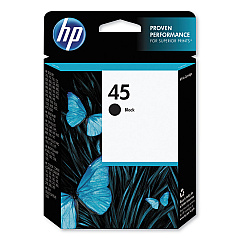
Astro Machine AstroJet 2650P Black Ink Cartridges

Enhance your printing experience with Astro Machine AstroJet 2650P Ink Cartridges, designed specifically for the AstroJet 2650P printer. These high-quality cartridges ensure crisp, professional-grade output for all your business, educational, healthcare, or wholesale needs. Compatible with the reliable HP 45 Black Ink Cartridge (51645A), these cartridges deliver exceptional print quality and longevity. The Astro Machine AstroJet 2650P Ink Cartridges are engineered to meet the demands of high-volume printing environments, offering consistent performance and reduced downtime. With their superior ink formulation, these cartridges produce sharp text and vibrant graphics, making them ideal for a wide range of applications. Whether you're printing important documents, labels, or marketing materials, trust in the reliability and efficiency of Astro Machine AstroJet 2650P Ink Cartridges to keep your operations running smoothly and your prints looking their best.

Astro Machine AstroJet 2650P Ink Cartridges FAQs

  • What printer model are these ink cartridges compatible with?

    These ink cartridges are specifically designed for the Astro Machine AstroJet 2650P printer.

  • Which HP ink cartridge is compatible with the AstroJet 2650P?

    The AstroJet 2650P is compatible with the HP 45 Black Ink Cartridge (51645A).

  • How long do these ink cartridges typically last?

    The lifespan of the cartridges depends on usage, but they are designed for high-volume printing environments and offer good longevity.

  • Are these cartridges suitable for printing on different types of media?

    Yes, these cartridges are versatile and can print on various media types, including paper, labels, and marketing materials.

  • Can I use third-party ink cartridges with the AstroJet 2650P?

    While third-party cartridges may work, it's recommended to use genuine Astro Machine AstroJet 2650P Ink Cartridges for optimal performance and print quality.

  • How do I install the ink cartridges in the AstroJet 2650P?

    Installation is simple. Open the printer's ink cartridge compartment, remove the old cartridge, and insert the new one until it clicks into place.

  • Are these cartridges environmentally friendly?

    While specific environmental claims aren't mentioned, many manufacturers offer recycling programs for used cartridges to reduce environmental impact.

  • What should I do if I experience print quality issues?

    First, ensure the cartridge is properly installed. If issues persist, try cleaning the print heads or running a printer maintenance cycle as per the user manual.

  • Can I buy these cartridges in bulk for my business?

    Yes, bulk purchasing options are often available for businesses with high-volume printing needs. Contact the supplier for more information.

  • What is the shelf life of unopened ink cartridges?

    Unopened ink cartridges typically have a shelf life of 1-2 years. Always check the expiration date on the packaging for specific information.

Warehouse Locations

Policy & Agreement | Copyright © 1995-2026 BlueDogInk.com
