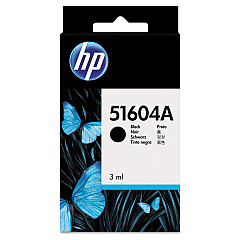





Addmaster MJ5000 Retail Equip. POS/Cash Reg. Supplies

Ads

Addmaster MJ5000 Black Ink Cartridges

Ensure uninterrupted printing with high-quality Addmaster MJ5000 Ink Cartridges. These reliable cartridges are designed to deliver crisp, clear text and graphics for your Addmaster MJ5000 printer. Choose from the original HP 51604A Black Ink Cartridge for authentic performance or opt for the cost-effective Innovera Remanufactured Black Ink, a replacement for 51604A. Both options guarantee consistent output and long-lasting results, making them ideal for businesses, educational institutions, government offices, healthcare facilities, and wholesale operations. The Addmaster MJ5000 Ink Cartridges are engineered to meet the demands of high-volume printing environments, ensuring minimal downtime and maximum productivity. With easy installation and compatibility, these cartridges allow you to maintain the efficiency of your Addmaster MJ5000 printer while producing professional-quality documents. Invest in these reliable ink cartridges to keep your printing operations running smoothly and cost-effectively.

Addmaster MJ5000 Retail Equip. POS/Cash Reg. Supplies FAQs

  • Are Addmaster MJ5000 Ink Cartridges compatible with other printer models?

    No, these cartridges are specifically designed for use with the Addmaster MJ5000 printer.

  • What is the difference between HP 51604A and Innovera Remanufactured cartridges?

    HP 51604A is the original manufacturer's cartridge, while Innovera Remanufactured is a more cost-effective alternative that has been refilled and tested for quality.

  • How long do Addmaster MJ5000 Ink Cartridges typically last?

    The lifespan of the cartridges depends on usage, but they are designed for high-volume printing environments and should last for several thousand pages.

  • Can I use third-party ink cartridges in my Addmaster MJ5000 printer?

    While third-party cartridges may work, it's recommended to use either HP original or approved remanufactured cartridges like Innovera to ensure optimal performance and print quality.

  • How do I install the ink cartridge in my Addmaster MJ5000 printer?

    Refer to your printer's user manual for specific instructions, but generally, you'll need to open the printer's cartridge compartment, remove the old cartridge, and insert the new one until it clicks into place.

  • Are these ink cartridges environmentally friendly?

    The Innovera Remanufactured cartridges are more environmentally friendly as they reuse cartridge bodies. HP also offers recycling programs for their original cartridges.

  • What should I do if the ink cartridge is not recognized by my printer?

    Try removing and reinserting the cartridge. If the issue persists, clean the cartridge contacts and try again. If problems continue, contact customer support.

  • Can I refill these ink cartridges myself?

    It's not recommended to refill these cartridges yourself as it may affect print quality and potentially damage your printer.

  • How should I store unused ink cartridges?

    Store unused cartridges in their original packaging, in a cool, dry place away from direct sunlight. Avoid extreme temperatures and humidity.

  • Do these ink cartridges come with a warranty?

    Yes, both HP original and Innovera Remanufactured cartridges typically come with a warranty. Check the product packaging or website for specific warranty details.

Warehouse Locations

Policy & Agreement | Copyright © 1995-2026 BlueDogInk.com
