




Addmaster MicrJET Retail Equip. POS/Cash Reg. Supplies

Ads

Addmaster MicrJET Black Ink Cartridges

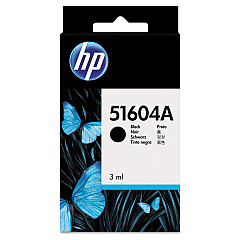
Addmaster MicrJET Ink Cartridges are essential components for businesses, educational institutions, government agencies, healthcare facilities, and wholesale operations relying on precise printing solutions. These high-quality cartridges, including the HP 51604A Black Ink Cartridge and Innovera Remanufactured Black Ink, are designed to deliver crisp, clear prints for various applications. Compatible with Addmaster MicrJET printers, these cartridges ensure consistent performance and longevity. The HP 51604A offers original equipment manufacturer (OEM) quality, while the Innovera Remanufactured option provides a cost-effective alternative without compromising on print quality. Both cartridges are engineered to meet the demands of high-volume printing environments, making them ideal for check printing, forms processing, and other specialized applications. By choosing Addmaster MicrJET Ink Cartridges, organizations can maintain optimal printer performance and produce professional-grade documents with confidence.

Addmaster MicrJET Retail Equip. POS/Cash Reg. Supplies FAQs

  • What printers are compatible with Addmaster MicrJET Ink Cartridges?

    Addmaster MicrJET Ink Cartridges are specifically designed for use with Addmaster MicrJET printers.

  • How long do Addmaster MicrJET Ink Cartridges typically last?

    The lifespan of these cartridges depends on usage, but they are designed for high-volume printing and generally last for several thousand pages.

  • Are there any differences between HP 51604A and Innovera Remanufactured cartridges?

    The HP 51604A is an OEM cartridge, while the Innovera is a remanufactured option. Both offer high-quality prints, but the Innovera may be more cost-effective.

  • Can I use these cartridges for check printing?

    Yes, Addmaster MicrJET Ink Cartridges are suitable for check printing and other specialized applications requiring precise, high-quality output.

  • How do I install an Addmaster MicrJET Ink Cartridge?

    Installation is typically straightforward. Consult your printer's manual for specific instructions, but generally, you'll need to open the printer, remove the old cartridge, and insert the new one until it clicks into place.

  • Are these cartridges environmentally friendly?

    The Innovera Remanufactured cartridge is more environmentally friendly as it reuses components from used cartridges. HP also offers recycling programs for their cartridges.

  • What should I do if I experience print quality issues?

    First, ensure the cartridge is properly installed. If issues persist, try cleaning the print heads or running a printer maintenance cycle as described in your printer's manual.

  • Can I refill these cartridges myself?

    It's not recommended to refill these cartridges yourself as it may affect print quality and potentially damage your printer. It's best to use new or properly remanufactured cartridges.

  • How should I store unused Addmaster MicrJET Ink Cartridges?

    Store cartridges in a cool, dry place away from direct sunlight. Keep them in their original packaging until ready for use to prevent drying out.

  • Do these cartridges come with a warranty?

    Yes, both HP and Innovera typically offer warranties on their cartridges. Check the specific product packaging or manufacturer's website for warranty details.

Warehouse Locations

Policy & Agreement | Copyright © 1995-2026 BlueDogInk.com
