





Ads

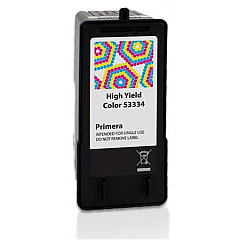
Primera Bravo SE-3 Disc Publisher Color Ink Cartridges

Ensure flawless disc printing with Primera Bravo SE-3 Disc Publisher Ink Cartridges. These high-quality cartridges, including the Primera 53334 Color Ink Cartridge, are specifically designed for optimal performance in your Primera Bravo SE-3 Disc Publisher. Delivering vibrant, long-lasting colors and sharp text, these cartridges produce professional-grade results for your CDs, DVDs, and Blu-ray discs. Whether you're creating marketing materials, archiving important data, or producing small-batch media runs, these ink cartridges guarantee consistent output and reliability. Compatible with various media types, they offer excellent coverage and quick-drying properties to prevent smudging. Maximize your disc publisher's potential and maintain its efficiency with these genuine Primera ink cartridges. Trust in the superior print quality and durability that Primera Bravo SE-3 Disc Publisher Ink Cartridges provide for all your disc publishing needs.

Primera Bravo SE-3 Disc Publisher Ink Cartridges FAQs

  • What is the page yield of the Primera 53334 Color Ink Cartridge?

    The page yield varies depending on the type of content being printed, but it typically produces around 300-400 full-color discs.

  • Are these ink cartridges compatible with other Primera disc publishers?

    These cartridges are specifically designed for the Primera Bravo SE-3 Disc Publisher. Always check your device's compatibility before purchasing.

  • How long do unopened ink cartridges last?

    Unopened ink cartridges typically have a shelf life of 1-2 years when stored properly in a cool, dry place.

  • Can I use third-party ink cartridges in my Primera Bravo SE-3 Disc Publisher?

    While third-party cartridges may work, using genuine Primera ink cartridges ensures optimal performance and print quality, and maintains your device's warranty.

  • How do I install the ink cartridge in my Primera Bravo SE-3 Disc Publisher?

    Open the front cover, wait for the ink carriage to center, remove the old cartridge, insert the new one, and close the cover. Consult your user manual for detailed instructions.

  • What types of discs can I print on using these ink cartridges?

    These ink cartridges are suitable for printing on various disc types, including CDs, DVDs, and Blu-ray discs with printable surfaces.

  • How can I tell if my ink cartridge is running low?

    The Primera Bravo SE-3 Disc Publisher software typically includes an ink level indicator. You may also notice a decrease in print quality when ink is running low.

  • Are these ink cartridges environmentally friendly?

    Primera strives to produce environmentally responsible products. However, for specific details on recycling and environmental impact, please contact Primera directly.

  • Can I refill these ink cartridges myself?

    Refilling ink cartridges is not recommended as it may compromise print quality and potentially damage your disc publisher. It's best to use new, genuine Primera cartridges.

  • What should I do if my prints appear faded or streaky?

    First, check your ink levels. If they're sufficient, run a print head cleaning cycle through your device's software. If issues persist, the cartridge may need replacement or your print head may require professional cleaning.

Warehouse Locations

Policy & Agreement | Copyright © 1995-2026 BlueDogInk.com
