




Ads

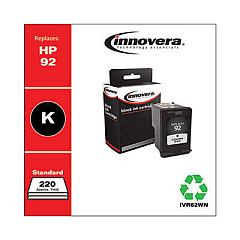
HP DeskJet 5400 Series Black Ink Cartridges

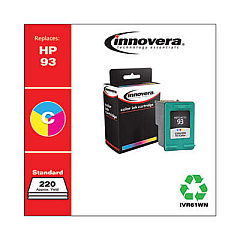
HP DeskJet 5400 Series Color Ink Cartridges

Ensure your HP DeskJet 5400 Series printer continues to deliver high-quality prints with genuine HP DeskJet 5400 Series Ink Cartridges. These reliable cartridges are designed specifically for optimal performance in your 5400 Series printer, producing crisp text and vibrant colors. The HP C9361WN Tricolor Ink Cartridge combines cyan, magenta, and yellow inks to create stunning color documents and photos, while the HP C9362WN Black Ink Cartridge delivers sharp, professional-looking text. Both cartridges are easy to install and offer long-lasting performance, reducing the frequency of replacements. Whether you're printing important business documents, school projects, or cherished family photos, these genuine HP ink cartridges ensure consistent, fade-resistant results. Trust in the quality and reliability of HP DeskJet 5400 Series Ink Cartridges to keep your printer running smoothly and your prints looking their best.

HP DeskJet 5400 Series Ink Cartridges FAQs

  • How long do HP DeskJet 5400 Series Ink Cartridges typically last?

    The lifespan of ink cartridges varies depending on usage, but on average, they can last for 200-300 pages for black ink and 150-200 pages for color ink.

  • Are these ink cartridges compatible with all HP DeskJet 5400 Series printers?

    Yes, these ink cartridges are designed to work with all HP DeskJet 5400 Series printers.

  • Can I use third-party ink cartridges in my HP DeskJet 5400 Series printer?

    While third-party cartridges may work, HP recommends using genuine HP ink cartridges for optimal print quality and printer performance.

  • How do I install the ink cartridges in my HP DeskJet 5400 Series printer?

    Open the printer's front access door, remove the old cartridge, insert the new cartridge into the correct slot, and push until it clicks into place. Close the access door to complete installation.

  • What should I do if my printer doesn't recognize the new ink cartridge?

    Try removing and reinserting the cartridge, cleaning the cartridge contacts, or restarting your printer. If issues persist, contact HP support.

  • Can I recycle used HP DeskJet 5400 Series Ink Cartridges?

    Yes, HP offers a free recycling program for used ink cartridges. Visit the HP website for details on how to participate.

  • How can I tell if my ink cartridge is genuine HP?

    Look for the HP logo on the packaging and cartridge, and check for a security seal. You can also verify the authenticity using the HP website.

  • What's the shelf life of unopened HP DeskJet 5400 Series Ink Cartridges?

    Unopened ink cartridges typically have a shelf life of 24 months from the date of manufacture when stored properly.

  • Can I use the color cartridge if the black cartridge is empty?

    Some HP printers allow printing with only the color cartridge, but print quality may be affected. It's best to replace the empty black cartridge for optimal results.

  • How can I troubleshoot print quality issues with my HP DeskJet 5400 Series Ink Cartridges?

    Try cleaning the print heads, aligning the cartridges, and ensuring you're using genuine HP ink cartridges. If problems persist, consult your printer's manual or contact HP support.

Warehouse Locations

Policy & Agreement | Copyright © 1995-2026 BlueDogInk.com
