





Ads

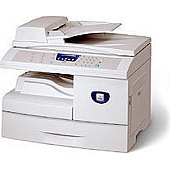
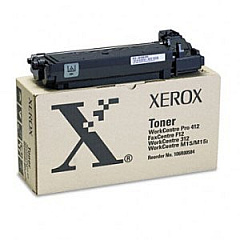
Xerox M15i Black Toner Cartridges

Xerox M15i Printer Accessories

Enhance your printing experience with genuine Xerox M15i Toner Cartridges, designed to deliver exceptional quality and reliability. The Xerox 106R00584 Black Toner Cartridge ensures crisp, professional-looking documents with every print. For improved workflow efficiency, consider adding the Xerox Automatic Document Feeder (498N00308), which streamlines scanning and copying tasks. Small businesses can benefit from the Xerox Scan to PC Desktop Small Business Edition (5 Seats) (301K23432), offering advanced document management capabilities. These high-performance supplies are specifically engineered for the Xerox M15i printer, guaranteeing optimal results and prolonging the life of your device. Whether you're printing important business documents, educational materials, or healthcare records, Xerox M15i Toner Cartridges provide the reliability and quality you need to maintain a professional image and keep your operations running smoothly.

Xerox M15i Printers Supplies FAQs

  • What is the page yield of the Xerox 106R00584 Black Toner Cartridge?

    The Xerox 106R00584 Black Toner Cartridge has a page yield of approximately 3,000 pages at 5% coverage.

  • Is the Xerox Automatic Document Feeder compatible with the M15i printer?

    Yes, the Xerox Automatic Document Feeder (498N00308) is fully compatible with the Xerox M15i printer.

  • How many users can access the Xerox Scan to PC Desktop Small Business Edition?

    The Xerox Scan to PC Desktop Small Business Edition (301K23432) supports up to 5 users.

  • Are these genuine Xerox supplies?

    Yes, all products listed are genuine Xerox supplies designed specifically for the Xerox M15i printer.

  • Can I use third-party toner cartridges in my Xerox M15i printer?

    While third-party cartridges may work, using genuine Xerox toner cartridges ensures optimal print quality and prevents potential damage to your printer.

  • How often should I replace the toner cartridge in my Xerox M15i?

    Replacement frequency depends on your printing volume. Replace the cartridge when print quality diminishes or when the printer indicates low toner levels.

  • Does the Automatic Document Feeder require separate installation?

    The Xerox Automatic Document Feeder (498N00308) may require professional installation. Consult the user manual or contact Xerox support for guidance.

  • Is the Scan to PC Desktop software compatible with Mac computers?

    The Xerox Scan to PC Desktop Small Business Edition is primarily designed for Windows operating systems. Check with Xerox for Mac compatibility.

  • Can I recycle used Xerox toner cartridges?

    Yes, Xerox offers a recycling program for used toner cartridges. Visit their website or contact customer support for details on how to participate.

  • What is the warranty period for these Xerox supplies?

    Warranty periods may vary by product. Typically, Xerox offers a limited warranty on their supplies. Check the product packaging or contact Xerox for specific warranty information.

Warehouse Locations

Policy & Agreement | Copyright © 1995-2026 BlueDogInk.com
