




Ads

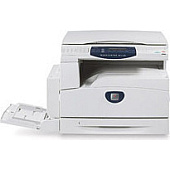
Xerox CopyCentre C118 Printer Accessories

Enhance your office productivity with Xerox CopyCentre C118 Printers Supplies, designed to meet the demands of businesses, educational institutions, government agencies, and healthcare facilities. Our comprehensive range includes the essential Xerox Scan to PC Desktop Small Business Edition (5 Seats) (301K23432), a powerful software solution that streamlines document management and workflow. This innovative tool allows you to effortlessly scan, organize, and share documents, boosting efficiency across your organization. Compatible with the Xerox CopyCentre C118, these supplies ensure optimal performance and superior print quality. Whether you're printing high-volume reports, creating professional presentations, or managing sensitive documents, our Xerox CopyCentre C118 Printers Supplies deliver consistent results. Invest in reliability and performance with our genuine Xerox supplies, tailored to meet the unique needs of your business or institution.

Xerox CopyCentre C118 Printers Supplies FAQs

  • What is included in the Xerox Scan to PC Desktop Small Business Edition?

    The Xerox Scan to PC Desktop Small Business Edition includes software licenses for 5 seats, allowing users to scan, organize, and manage documents efficiently.

  • Is the Xerox Scan to PC Desktop Small Business Edition compatible with the CopyCentre C118?

    Yes, the Xerox Scan to PC Desktop Small Business Edition is fully compatible with the CopyCentre C118 printer.

  • How does the Scan to PC Desktop software improve productivity?

    The software streamlines document management by allowing users to easily scan, organize, edit, and share documents, saving time and improving workflow efficiency.

  • Can I upgrade the number of seats for the Scan to PC Desktop software?

    Yes, you can purchase additional seat licenses to expand the number of users who can access the software.

  • What operating systems are supported by the Xerox Scan to PC Desktop software?

    The software is compatible with Windows operating systems. Please check the specific system requirements for the latest version.

  • Does the Xerox CopyCentre C118 require special toner cartridges?

    Yes, the CopyCentre C118 uses specific Xerox toner cartridges designed for optimal performance with this printer model.

  • How often should I replace the drum unit in the CopyCentre C118?

    The drum unit typically needs replacement after processing approximately 60,000 pages, but this can vary based on usage and print patterns.

  • Are there any maintenance kits available for the CopyCentre C118?

    Yes, Xerox offers maintenance kits for the CopyCentre C118 to help maintain optimal performance and extend the life of the printer.

  • Can I use third-party supplies with the Xerox CopyCentre C118?

    While third-party supplies may work, using genuine Xerox supplies is recommended to ensure optimal print quality and prevent potential damage to the printer.

  • What is the average page yield for toner cartridges used in the CopyCentre C118?

    The page yield varies depending on the specific cartridge model, but typically ranges from 11,000 to 24,000 pages at 5% coverage.

Warehouse Locations

Policy & Agreement | Copyright © 1995-2026 BlueDogInk.com
