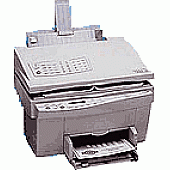





HP OfficeJet R80xi Multifunction Printers Supplies

Ads

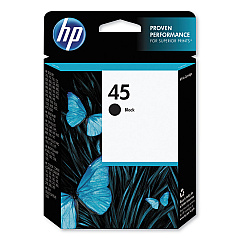
HP OfficeJet R80xi Black Ink Cartridges

Ensure your HP OfficeJet R80xi printer maintains its exceptional performance with genuine HP OfficeJet R80xi Ink Cartridges. The HP 45 Black Ink Cartridge (51645A) is specifically designed for this versatile all-in-one printer, delivering crisp, professional-quality text and graphics. Whether you're printing important business documents, school assignments, or healthcare records, these cartridges provide reliable, smudge-resistant results. With a high page yield, you'll experience fewer interruptions and more cost-effective printing. The HP OfficeJet R80xi Ink Cartridges are easy to install and compatible with various HP printer models, making them a convenient choice for offices, educational institutions, and government agencies. Trust in the superior quality and consistency of genuine HP ink to keep your OfficeJet R80xi running smoothly and producing outstanding prints for all your important tasks.

HP OfficeJet R80xi Multifunction Printers Supplies FAQs

  • How long does an HP 45 Black Ink Cartridge typically last?

    The HP 45 Black Ink Cartridge typically yields around 930 pages, depending on print density and usage patterns.

  • Is the HP 45 Black Ink Cartridge compatible with other HP printers?

    Yes, the HP 45 Black Ink Cartridge is compatible with various HP printer models, not just the OfficeJet R80xi.

  • Can I use third-party ink cartridges in my HP OfficeJet R80xi?

    While third-party cartridges may work, using genuine HP ink cartridges is recommended for optimal print quality and to maintain your printer's warranty.

  • How do I install the HP 45 Black Ink Cartridge in my OfficeJet R80xi?

    Open the printer's front cover, remove the old cartridge, insert the new HP 45 cartridge, and close the cover. The printer should recognize the new cartridge automatically.

  • What should I do if my printer doesn't recognize the new ink cartridge?

    Try removing and reinserting the cartridge, cleaning the contacts, or running the printer's alignment process. If issues persist, consult your printer's manual or contact HP support.

  • Can I recycle my used HP 45 Black Ink Cartridges?

    Yes, HP offers a free recycling program for used ink cartridges. You can return them to participating retailers or request a shipping label from HP's website.

  • How can I check the ink levels in my HP OfficeJet R80xi?

    You can check ink levels through your printer's control panel or by using the HP software installed on your computer.

  • Does the HP 45 Black Ink Cartridge come with a warranty?

    Yes, genuine HP ink cartridges come with a warranty that covers defects in materials and workmanship.

  • Can I use the HP 45 Black Ink Cartridge for photo printing?

    While the HP 45 is a black ink cartridge primarily designed for text and graphics, it can be used for black and white photo printing. For best results with color photos, use in conjunction with color cartridges.

  • How should I store unused HP 45 Black Ink Cartridges?

    Store unused cartridges in their original sealed packaging at room temperature, away from direct sunlight and heat sources, to maintain their quality and shelf life.

Warehouse Locations

Policy & Agreement | Copyright © 1995-2026 BlueDogInk.com
