




Ads

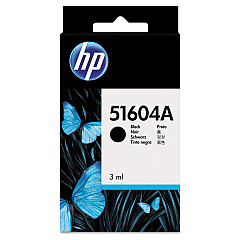
HP Quietjet Plus Black Ink Cartridges

Enhance your printing experience with HP Quietjet Plus Ink Cartridges, designed specifically for the HP Quietjet Plus printer. These high-quality cartridges, including the HP 51604A Black Ink Cartridge, deliver crisp, professional-looking documents with every print. Perfect for businesses, schools, government offices, healthcare facilities, and wholesale operations, these cartridges ensure consistent performance and reliability. The HP Quietjet Plus Ink Cartridges are engineered to work seamlessly with your printer, providing optimal print quality and longevity. With their easy installation and long-lasting output, these cartridges minimize downtime and maximize productivity. Trust in the superior quality of HP ink to produce sharp text and clear graphics for all your printing needs. Choose HP Quietjet Plus Ink Cartridges for dependable, high-quality results that meet the demands of your busy work environment.

HP Quietjet Plus Printers Supplies FAQs

  • What printer model is compatible with HP Quietjet Plus Ink Cartridges?

    HP Quietjet Plus Ink Cartridges are specifically designed for use with the HP Quietjet Plus printer.

  • How long does an HP 51604A Black Ink Cartridge typically last?

    The lifespan of an HP 51604A Black Ink Cartridge depends on usage, but it generally yields around 500-600 pages.

  • Are HP Quietjet Plus Ink Cartridges available in colors other than black?

    No, the HP Quietjet Plus printer only uses black ink cartridges.

  • Can I use third-party ink cartridges in my HP Quietjet Plus printer?

    While third-party cartridges may work, using genuine HP ink cartridges is recommended for optimal performance and print quality.

  • How do I install an HP Quietjet Plus Ink Cartridge?

    To install, open the printer's cartridge access door, remove the old cartridge, insert the new one, and close the access door. Refer to your printer's manual for detailed instructions.

  • Are HP Quietjet Plus Ink Cartridges environmentally friendly?

    HP offers a recycling program for used ink cartridges, helping to reduce environmental impact.

  • What should I do if my HP Quietjet Plus Ink Cartridge is not recognized by the printer?

    Try removing and reinserting the cartridge, cleaning the cartridge contacts, or restarting the printer. If issues persist, contact HP support.

  • Can I refill my HP Quietjet Plus Ink Cartridges?

    HP does not recommend refilling cartridges as it may affect print quality and potentially damage the printer.

  • How should I store unused HP Quietjet Plus Ink Cartridges?

    Store cartridges in their original packaging at room temperature, away from direct sunlight and heat sources.

  • Is there a warranty on HP Quietjet Plus Ink Cartridges?

    Yes, genuine HP ink cartridges come with a warranty against defects in materials and workmanship.

Warehouse Locations

Policy & Agreement | Copyright © 1995-2026 BlueDogInk.com
