









Ads

HP LaserJet 8000 Black Toner Cartridges

HP LaserJet 8000 Copy Paper

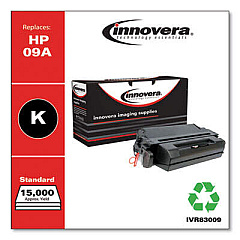
Ensure uninterrupted, high-quality printing with HP LaserJet 8000 Toner Cartridges. These reliable cartridges are designed specifically for the HP LaserJet 8000 series printers, delivering crisp, professional-grade text and graphics. The Innovera Remanufactured Black Toner, a replacement for the 09A (C3909A), offers an eco-friendly and cost-effective alternative without compromising on print quality. With a generous yield, these cartridges minimize downtime and maximize productivity in busy office environments. Whether you're printing important business documents, educational materials, or healthcare records, HP LaserJet 8000 Toner Cartridges provide consistent, smudge-free results. Compatible with various models in the 8000 series, these cartridges ensure your printer performs at its best, meeting the demands of high-volume printing tasks across various sectors including business, education, government, and healthcare.

HP LaserJet 8000 Toner Cartridges FAQs

  • What is the page yield of the HP LaserJet 8000 Toner Cartridge?

    The standard HP LaserJet 8000 Toner Cartridge typically yields around 15,000 pages at 5% coverage.

  • Is the Innovera Remanufactured Black Toner compatible with all HP LaserJet 8000 series printers?

    Yes, the Innovera Remanufactured Black Toner is compatible with all HP LaserJet 8000 series printers that use the 09A (C3909A) cartridge.

  • How does the print quality of the remanufactured cartridge compare to the original HP cartridge?

    The Innovera Remanufactured Black Toner is designed to meet or exceed OEM standards, providing comparable print quality to the original HP cartridge.

  • What is the shelf life of HP LaserJet 8000 Toner Cartridges?

    Unopened toner cartridges typically have a shelf life of 18-24 months when stored properly in a cool, dry place.

  • Are these toner cartridges environmentally friendly?

    Yes, especially the remanufactured cartridges, which help reduce waste by reusing cartridge components and reducing the need for new materials.

  • How do I install the toner cartridge in my HP LaserJet 8000 printer?

    To install, open the printer's front cover, remove the old cartridge, unpack the new one, and insert it into the printer until it clicks into place. Close the cover to complete installation.

  • Can I use these cartridges in other HP LaserJet models?

    These cartridges are specifically designed for the HP LaserJet 8000 series. Always check your printer's compatibility before purchasing toner cartridges.

  • What should I do with my empty toner cartridges?

    Empty cartridges can be recycled. Many office supply stores and manufacturers offer recycling programs for used toner cartridges.

  • How can I extend the life of my HP LaserJet 8000 Toner Cartridge?

    To extend cartridge life, use draft mode for non-critical prints, shake the cartridge gently when low on toner, and ensure your printer is regularly maintained.

  • Are these toner cartridges covered by a warranty?

    Yes, most toner cartridges come with a standard warranty. Check the specific product details or contact the seller for warranty information.

Warehouse Locations

Policy & Agreement | Copyright © 1995-2026 BlueDogInk.com
