













Ads

Epson PM200 Color Ink Cartridges

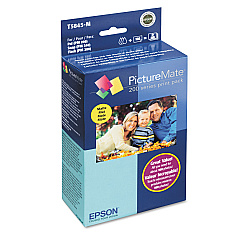
  • Epson T5845-M Print Pack

    Item T5845-M

    Epson T5845-M Print Pack

    PictureMate Print Pack; Contains 1 Ink Cartridge, 100 Sheets of Matte 4" x 6" Ph..

    Status

    In Stock

    $36.54

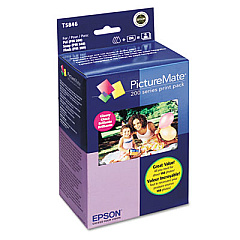
  • Epson T5846 Print Pack

    Item T5846

    Epson T5846 Print Pack

    PictureMate Print Pack; Contains 1 Ink Cartridge, 150 Sheets of Glossy 4" x 6" P..

    Status

    In Stock

    $43.04

Epson PM200 Photo Paper

Enhance your printing experience with genuine Epson PM200 Ink Cartridges, designed specifically for the Epson PictureMate PM200 photo printer. These high-quality cartridges, including the Epson T5845-M Print Pack and Epson T5846 Print Pack, deliver stunning, long-lasting prints with vibrant colors and sharp details. The Epson PM200 Ink Cartridges are easy to install and provide consistent, reliable performance for all your photo printing needs. Whether you're printing cherished memories or professional-quality images, these cartridges ensure exceptional results every time. With their advanced formulation, these inks resist fading, smudging, and water damage, preserving your photos for years to come. Trust in the superior quality of Epson PM200 Ink Cartridges to bring your digital images to life with unparalleled clarity and brilliance.

Epson PM200 Ink Cartridges FAQs

  • What is the difference between the Epson T5845-M and T5846 Print Packs?

    The T5845-M is a monochrome print pack, while the T5846 is a color print pack.

  • How many prints can I expect from each cartridge?

    The yield varies depending on the specific cartridge and print settings, but typically ranges from 100-150 4x6 photos.

  • Are these cartridges compatible with other Epson printers?

    No, these cartridges are specifically designed for the Epson PictureMate PM200 printer.

  • How long do the prints last?

    When stored properly, prints can last up to 100 years without significant fading.

  • Can I use third-party ink cartridges in my Epson PM200?

    While third-party cartridges may work, using genuine Epson cartridges ensures the best print quality and printer longevity.

  • How do I install the ink cartridges?

    Simply open the cartridge compartment, remove the old cartridge, and insert the new one until it clicks into place.

  • Are these cartridges environmentally friendly?

    Epson cartridges are designed to be recyclable, and Epson offers a cartridge recycling program.

  • How should I store unused ink cartridges?

    Store them in a cool, dry place in their original packaging until ready for use.

  • Can I refill these cartridges?

    Refilling is not recommended as it may compromise print quality and potentially damage your printer.

  • What should I do if my printer doesn't recognize the new cartridge?

    Ensure the cartridge is properly seated and clean the cartridge contacts. If issues persist, contact Epson support.

Warehouse Locations

Policy & Agreement | Copyright © 1995-2026 BlueDogInk.com
