









Ads

Copystar CS-1815 Black Toner Cartridges

Copystar CS-1815 Copy Paper

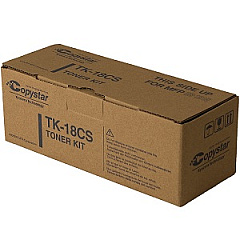
Enhance your printing efficiency with genuine Copystar CS-1815 Toner Cartridges. Designed specifically for the Copystar CS-1815 printer, these high-quality cartridges ensure crisp, professional-grade output for all your business, educational, or healthcare documents. The Copystar TK18CS Black Toner Cartridge delivers exceptional print quality and reliability, making it an ideal choice for high-volume printing environments. With its long-lasting performance, you'll experience fewer interruptions and reduced maintenance costs. These toner cartridges are engineered to meet Copystar's strict quality standards, guaranteeing optimal performance and compatibility with your CS-1815 printer. Whether you're printing reports, presentations, or everyday correspondence, trust Copystar CS-1815 Toner Cartridges to deliver consistent, sharp results. Invest in genuine Copystar supplies to protect your printer and maintain its peak performance throughout its lifecycle.

Copystar CS-1815 Toner Cartridges FAQs

  • What is the page yield of the Copystar TK18CS Black Toner Cartridge?

    The Copystar TK18CS Black Toner Cartridge typically yields approximately 7,200 pages at 5% coverage.

  • Are these toner cartridges compatible with other Copystar printer models?

    The Copystar TK18CS Black Toner Cartridge is specifically designed for the CS-1815 model. It may not be compatible with other Copystar printer models.

  • How long does a Copystar CS-1815 Toner Cartridge typically last?

    The lifespan of a toner cartridge depends on usage, but under normal printing conditions, it should last several months to a year.

  • Can I use third-party or remanufactured toner cartridges in my Copystar CS-1815 printer?

    While third-party cartridges may work, using genuine Copystar toner cartridges is recommended to ensure optimal print quality and prevent potential damage to your printer.

  • How do I install a new toner cartridge in my Copystar CS-1815 printer?

    Consult your printer's user manual for specific instructions, but generally, you'll need to open the front cover, remove the old cartridge, and insert the new one until it clicks into place.

  • Are Copystar CS-1815 Toner Cartridges environmentally friendly?

    Copystar is committed to environmental sustainability and offers recycling programs for used toner cartridges. Check their website for details on how to recycle your used cartridges.

  • How can I tell if my Copystar CS-1815 Toner Cartridge is running low?

    Your printer should display a low toner warning on its control panel or through your computer's print dialog when the cartridge is running low.

  • Can I buy Copystar CS-1815 Toner Cartridges in bulk?

    Yes, many suppliers offer bulk purchasing options for Copystar toner cartridges, which can help reduce costs for high-volume users.

  • What should I do if I experience print quality issues with my Copystar CS-1815 Toner Cartridge?

    First, ensure the cartridge is properly installed. If issues persist, try printing a test page or cleaning the printer. If problems continue, contact Copystar support or your supplier for assistance.

  • Are there any special storage requirements for Copystar CS-1815 Toner Cartridges?

    Store toner cartridges in a cool, dry place away from direct sunlight. Keep them in their original packaging until ready for use to protect them from dust and damage.

Warehouse Locations

Policy & Agreement | Copyright © 1995-2026 BlueDogInk.com
