







Ads

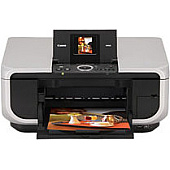
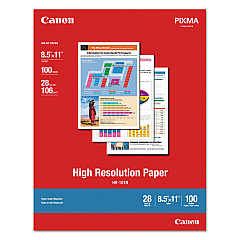
Canon PIXMA MP600 Photo Paper

Enhance your printing experience with genuine Canon PIXMA MP600 Ink Cartridges. These high-quality cartridges ensure crisp text and vibrant images for all your printing needs. Choose from a variety of options, including the convenient Canon CLI-8 Color Ink Pack and Multipack for all your color printing requirements. For those who primarily print in black and white, the Canon PGI-5BK Black Ink Cartridge and Twin Pack offer excellent value. The individual CLI-8 cartridges in Black, Cyan, Magenta, and Yellow allow for easy replacement of specific colors as needed. For the best of both worlds, consider the Canon PGI-5 CLI-8 Combo Pack, which includes both black and color cartridges. With these genuine Canon ink cartridges, your PIXMA MP600 printer will consistently deliver professional-quality prints for home, office, or creative projects.

Canon PIXMA MP600 Ink Cartridges FAQs

  • Are these ink cartridges compatible with other Canon printers?

    While these cartridges are designed for the Canon PIXMA MP600, they may be compatible with other Canon printer models. Check your printer's manual or the Canon website for compatibility information.

  • How long do these ink cartridges typically last?

    The lifespan of ink cartridges varies depending on usage and print settings. On average, a standard cartridge can print 200-300 pages.

  • Can I use third-party ink cartridges in my Canon PIXMA MP600?

    While third-party cartridges may work, using genuine Canon ink cartridges ensures the best print quality and helps maintain your printer's warranty.

  • What's the difference between PGI and CLI cartridges?

    PGI cartridges contain pigment-based ink for text, while CLI cartridges use dye-based ink for color printing.

  • How do I install these ink cartridges in my Canon PIXMA MP600?

    Open the printer's front cover, wait for the cartridge holder to move to the center, then gently push the new cartridge into the appropriate slot until it clicks.

  • Can I recycle empty ink cartridges?

    Yes, Canon offers a recycling program for empty ink cartridges. Check their website for details on how to participate.

  • What should I do if my printer doesn't recognize the new cartridge?

    Try removing and reinserting the cartridge. If the issue persists, clean the cartridge contacts and try again. If problems continue, contact Canon support.

  • How should I store unused ink cartridges?

    Store unused cartridges in a cool, dry place away from direct sunlight. Keep them in their original packaging until ready for use.

  • Is it necessary to replace all color cartridges at once?

    No, you can replace individual color cartridges as needed. The printer will indicate which specific cartridge needs replacement.

  • What's the shelf life of these ink cartridges?

    Unopened ink cartridges typically have a shelf life of 1-2 years. Always check the expiration date on the packaging before use.

Warehouse Locations

Policy & Agreement | Copyright © 1995-2026 BlueDogInk.com
