





Ads

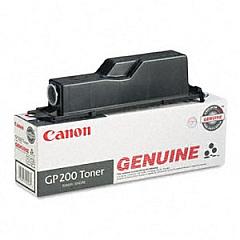
Canon imageRUNNER 210 Black Toner Cartridges

Ensure uninterrupted productivity with genuine Canon imageRUNNER 210 Toner Cartridges. These high-quality consumables are specifically designed for the Canon imageRUNNER 210 copier, delivering crisp, clear text and images for all your business documents. The Canon GP200 Black Toner Cartridge is the perfect choice for this model, offering exceptional print quality and reliability. With a generous yield, you'll minimize downtime and reduce overall printing costs. These toner cartridges are engineered to work seamlessly with your Canon imageRUNNER 210, preventing potential damage to your device and maintaining its optimal performance. Whether you're printing reports, presentations, or everyday correspondence, trust Canon's original toner cartridges to provide consistent, professional results. Invest in genuine Canon supplies to protect your equipment and ensure the best possible output for your important business documents.

Canon imageRUNNER 210 Printers Supplies FAQs

  • How long does a Canon GP200 Black Toner Cartridge typically last?

    The Canon GP200 Black Toner Cartridge typically yields around 15,000 pages, depending on print density and usage patterns.

  • Are compatible or remanufactured toner cartridges available for the Canon imageRUNNER 210?

    While third-party options may exist, it's recommended to use genuine Canon toner cartridges to ensure optimal performance and protect your device.

  • How can I tell if my Canon imageRUNNER 210 toner cartridge needs replacement?

    The device will display a low toner warning message when the cartridge is running low. You may also notice a decrease in print quality.

  • Can I recycle my used Canon imageRUNNER 210 toner cartridges?

    Yes, Canon offers a recycling program for used toner cartridges. Check their website for details on how to participate.

  • Is the Canon GP200 Black Toner Cartridge compatible with other Canon printers?

    The GP200 is specifically designed for the Canon imageRUNNER 210 and may not be compatible with other models. Always check your printer's specifications.

  • How should I store unused Canon imageRUNNER 210 toner cartridges?

    Store cartridges in a cool, dry place away from direct sunlight. Keep them in their original packaging until ready for use.

  • What should I do if I experience print quality issues with my Canon imageRUNNER 210?

    First, check if the toner cartridge needs replacement. If issues persist, consult the user manual for troubleshooting steps or contact Canon support.

  • Can I use the Canon GP200 Black Toner Cartridge immediately after removing it from cold storage?

    It's best to let the cartridge reach room temperature before installation to prevent condensation and potential print quality issues.

  • How do I properly install a new toner cartridge in my Canon imageRUNNER 210?

    Refer to the user manual for step-by-step instructions. Generally, you'll need to open the front cover, remove the old cartridge, and insert the new one until it clicks into place.

  • Does using genuine Canon toner cartridges affect my printer's warranty?

    Using genuine Canon toner cartridges helps maintain your printer's warranty. Using third-party cartridges may void the warranty if they cause damage to the device.

Warehouse Locations

Policy & Agreement | Copyright © 1995-2026 BlueDogInk.com
