










Ads

Canon imageCLASS MF3010 Black Toner Cartridges

Canon imageCLASS MF3010 Copy Paper

Canon imageCLASS MF3010 Warranty and Services

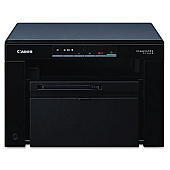
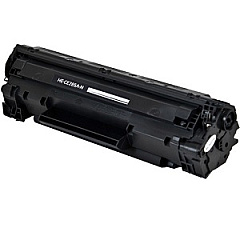
Ensure optimal performance for your Canon imageCLASS MF3010 with genuine Canon imageCLASS MF3010 Toner Cartridges. The MF3010 is a compact, all-in-one laser printer designed for small offices and home use, offering high-quality printing, copying, and scanning capabilities. To maintain its exceptional output, it relies on the Canon 125 Black Toner Cartridge, which delivers crisp, professional-looking documents with every print. This reliable toner cartridge is engineered to work seamlessly with your MF3010, providing consistent results and minimizing downtime. With a yield of approximately 1,600 pages, it offers an economical solution for your printing needs. By choosing genuine Canon toner cartridges, you'll protect your printer's warranty and ensure the best possible print quality. Don't compromise on your printing experience – trust the Canon 125 Black Toner Cartridge for your Canon imageCLASS MF3010.

Canon imageCLASS MF3010 Toner Cartridges FAQs

  • What is the page yield of the Canon 125 Black Toner Cartridge?

    The Canon 125 Black Toner Cartridge has an approximate yield of 1,600 pages.

  • Is the Canon 125 Black Toner Cartridge compatible with other printers?

    The Canon 125 Black Toner Cartridge is specifically designed for the Canon imageCLASS MF3010 and may not be compatible with other printer models.

  • How often should I replace the toner cartridge in my Canon imageCLASS MF3010?

    The frequency of replacement depends on your printing volume. Replace the cartridge when print quality diminishes or when the printer indicates low toner levels.

  • Can I use third-party toner cartridges in my Canon imageCLASS MF3010?

    While third-party cartridges may work, using genuine Canon toner cartridges is recommended to ensure optimal print quality and to maintain your printer's warranty.

  • How do I install the Canon 125 Black Toner Cartridge in my MF3010?

    Open the front cover of the printer, remove the old cartridge, unpack the new one, and insert it into the printer until it clicks into place. Then close the front cover.

  • What should I do with my used toner cartridge?

    Canon offers a recycling program for used toner cartridges. You can return them to Canon or dispose of them according to local regulations.

  • How can I extend the life of my toner cartridge?

    To extend cartridge life, use draft mode for non-critical prints, print in black and white when possible, and avoid printing unnecessary pages.

  • Does the Canon 125 Black Toner Cartridge come with a warranty?

    Yes, genuine Canon toner cartridges typically come with a warranty against defects in materials and workmanship.

  • Can I refill the Canon 125 Black Toner Cartridge myself?

    Refilling toner cartridges is not recommended as it may result in poor print quality and could potentially damage your printer.

  • How long can I store an unopened Canon 125 Black Toner Cartridge?

    An unopened toner cartridge can typically be stored for about two years from the date of purchase, provided it's kept in a cool, dry place away from direct sunlight.

Warehouse Locations

Policy & Agreement | Copyright © 1995-2026 BlueDogInk.com
