









Ads

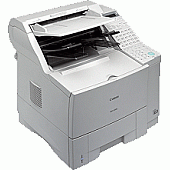
Canon FAX-L1000 Black Toner Cartridges

Canon FAX-L1000 Copy Paper

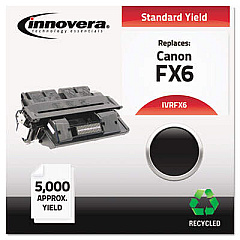
Ensure uninterrupted faxing with high-quality Canon FAX-L1000 Toner Cartridges. These reliable cartridges are designed to deliver crisp, clear text and images for your important documents. Compatible with the Canon FAX-L1000 machine, these toner cartridges offer exceptional value and performance. The Innovera Remanufactured Black Toner, a replacement for the FX-6 (1559A002AA), provides an eco-friendly and cost-effective alternative without compromising on quality. This cartridge is meticulously remanufactured to meet or exceed OEM specifications, ensuring consistent output and longevity. Whether you're in a busy office, educational institution, healthcare facility, or government agency, these toner cartridges will meet your high-volume faxing needs. Experience reliable performance, sharp text, and clear graphics with every print. Choose Canon FAX-L1000 Toner Cartridges for professional-grade results and keep your communication flowing smoothly.

Canon FAX-L1000 Toner Cartridges FAQs

  • What is the page yield of the Canon FAX-L1000 toner cartridge?

    The page yield varies depending on the specific cartridge model, but typically ranges from 5,000 to 7,000 pages at 5% coverage.

  • Is the Innovera Remanufactured Black Toner compatible with the Canon FAX-L1000?

    Yes, the Innovera Remanufactured Black Toner is fully compatible with the Canon FAX-L1000 fax machine.

  • How long does a Canon FAX-L1000 toner cartridge typically last?

    The lifespan of a toner cartridge depends on usage, but under normal conditions, it can last several months to a year.

  • Are remanufactured toner cartridges as good as OEM cartridges?

    High-quality remanufactured cartridges like Innovera are designed to meet or exceed OEM specifications and often provide comparable performance at a lower cost.

  • Can I use a different brand of toner cartridge in my Canon FAX-L1000?

    While it's possible to use compatible cartridges, it's recommended to use Canon-approved or high-quality remanufactured cartridges to ensure optimal performance and prevent potential damage to your fax machine.

  • How do I install a new toner cartridge in the Canon FAX-L1000?

    To install a new cartridge, open the front cover, remove the old cartridge, unpack the new one, and insert it into the machine until it clicks into place. Close the cover to complete installation.

  • What should I do with my used toner cartridges?

    Many office supply stores and manufacturers offer recycling programs for used toner cartridges. You can also check with local recycling centers for proper disposal options.

  • How can I tell when my Canon FAX-L1000 toner cartridge needs to be replaced?

    The fax machine will typically display a low toner warning. You may also notice faded or inconsistent print quality, which indicates it's time to replace the cartridge.

  • Is it safe to use remanufactured toner cartridges in my Canon FAX-L1000?

    Yes, high-quality remanufactured cartridges from reputable brands like Innovera are safe to use and should not damage your fax machine.

  • Can I refill my Canon FAX-L1000 toner cartridge instead of replacing it?

    While it's possible to refill toner cartridges, it's not recommended as it can lead to poor print quality and potential damage to your fax machine. It's best to use new or properly remanufactured cartridges.

Warehouse Locations

Policy & Agreement | Copyright © 1995-2026 BlueDogInk.com
